
Employees can only ask for things you have defined. That list lives at Settings → Organization → Request Types, or go straight to Request Types.
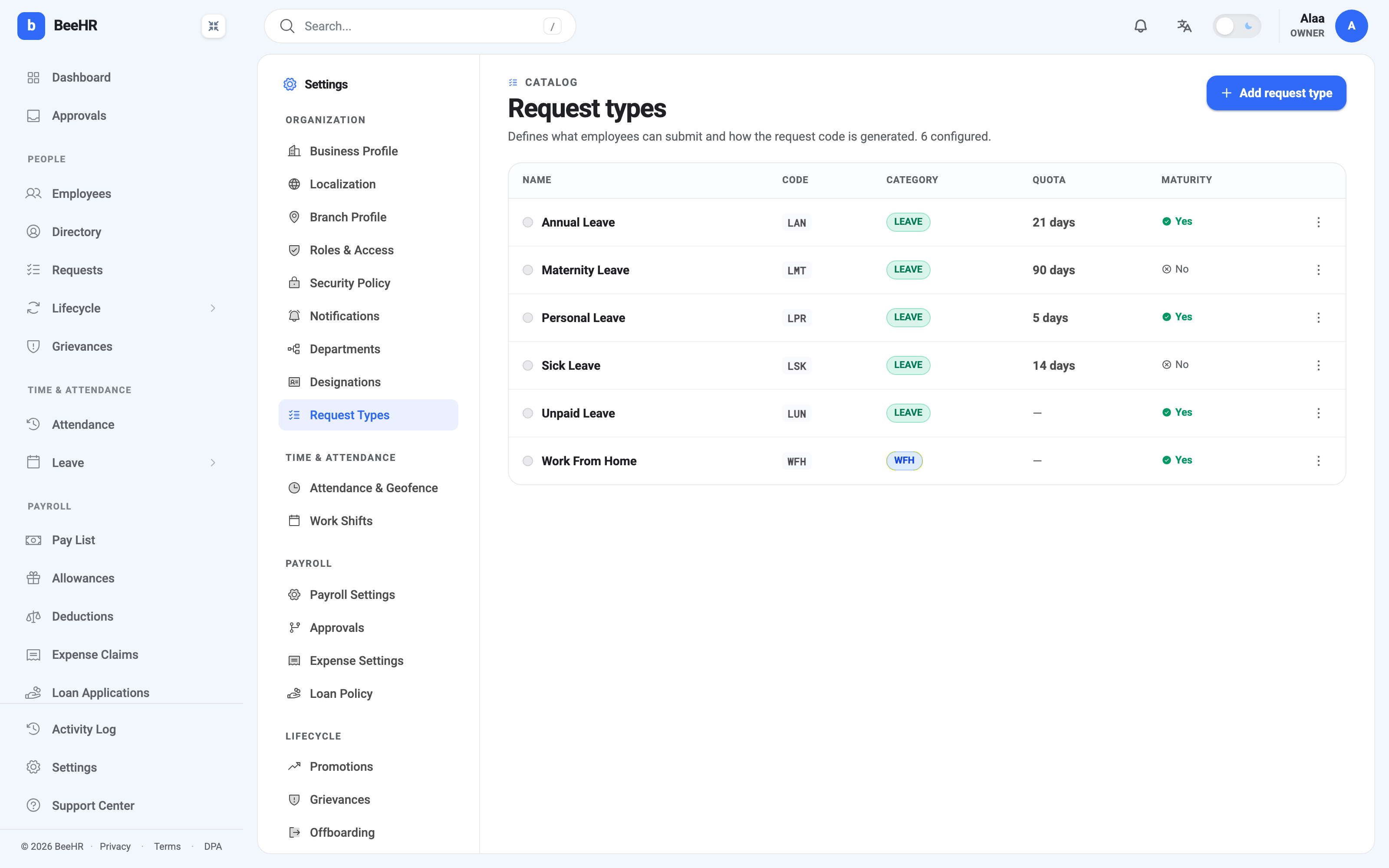
The five columns
Name is what employees pick from when filing a request.
Code is a three-letter prefix that goes into every request code of this
type — LAN produces HR-LAN-2026-00007. Pick something you’d recognise on a
report, and pick it carefully: changing it later doesn’t rewrite the codes
already issued, so you end up with two prefixes meaning the same thing.
Category is leave, wfh or other, and it’s the setting with the most
consequences. Only leave types count workdays, check a balance, appear in
leave reports and mark the attendance grid. A type in the other category is
just a logged request with an approval on it. If you’re adding “Business Travel”
and want it deducted from an allowance, it has to be a leave type.
Quota is how many days a year each employee gets. Leave it empty for unlimited — Unpaid Leave and Work From Home both do, which is why they show a dash. A quota is a per-person, per-year allowance, not a company-wide pool.
Maturity decides whether requests of this type expire. See below.
Maturity, in one paragraph
Maturity Yes means a request of this type gets a deadline, and if nobody has decided by then, BeeHR rejects it overnight. Maturity No means it waits indefinitely.
Look at how the defaults use it. Annual Leave, Personal Leave, Unpaid Leave and Work From Home all expire — asking to be off next Tuesday is meaningless once Tuesday has passed. Sick Leave and Maternity Leave don’t, because those are usually filed after the fact and a slow approval shouldn’t erase them.
That’s the test for anything you add: would this request still make sense if it were approved a month late? If not, turn maturity on. The mechanics are in Deadlines and Automatic Rejection.
Adding a type
Add request type asks for the same five things. The one to think about is category, since it determines everything the type is capable of, and the one to get right first time is the code prefix.
Colours and icons can be set as well; they only change how the type looks in lists.
Changing or removing one
Editing a type affects requests filed after the change. A quota raised from 21 to 25 applies to balances going forward; it does not retroactively give people back days they used last year.
Deleting a type is where care is needed. Requests already filed under it don’t disappear, and you’re left with historical rows referring to something no longer in the catalog. If a type has fallen out of use, the tidier move is to stop offering it and leave the definition in place so old requests still read correctly.
Note — This screen defines what can be asked for. It does not decide who approves it — that’s the reporting line on each employee — and it doesn’t set anyone’s individual balance. Quota here is the default everybody starts from.