
There is no separate leave module in BeeHR. Leave is a category of request, and everything you already know about how requests work applies unchanged — the codes, the three statuses, the approver routing, the deadlines.
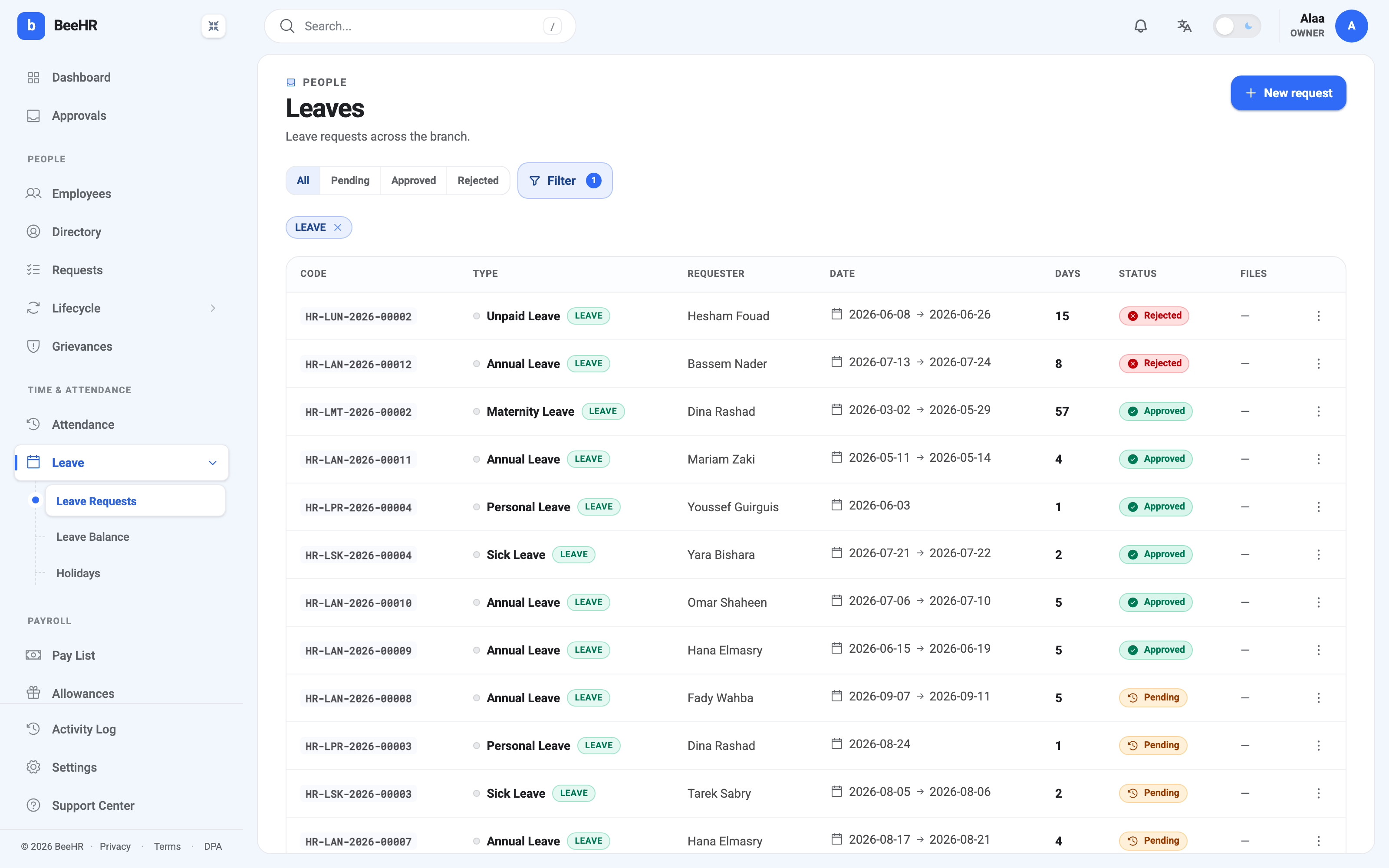
Leave → Leave Requests in the sidebar is this view. Removing the chip gives you every request in the branch, which is a good way to see that leave really is just a slice of the same table.
What the leave category adds
Marking a request type as leave — done in
Request Types — switches on three things a
plain request doesn’t have.
A day count. BeeHR works out how many workdays the request covers, skipping the branch weekend and any public holidays in the branch’s country. That’s why Dina’s maternity leave from 2 March to 29 May reads 57 days rather than the 89 on the calendar, and why a Monday-to-Friday annual leave request across a holiday costs four days instead of five.
A balance. Approved days come off an allowance, and pending ones are held against it. This is what makes “how much have I got left?” answerable. See Leave Balances and Quotas.
A place in the leave reports. Leave types appear in the company-wide balance report and feed the leave and attendance dashboards. Non-leave requests don’t.
A Work From Home request has none of that: one date, no day count, no balance. It is an approval, logged.
The three screens under Leave
Leave Requests — the filtered table above, for finding and actioning individual requests.
Leave Balance — the whole company at once, every person against every leave type. Use it when planning, or when somebody asks how much of the year’s allowance is still outstanding across a team.
Holidays — the calendar of days the company is closed. It isn’t leave, but it belongs here because it directly changes what leave costs: every day on that calendar is a day BeeHR won’t deduct from anyone’s balance. See Public Holidays.
Quota is per person, per year
An allowance of 21 days means each employee gets 21 days in a calendar year, not that the company has 21 to share out. Balances reset with the year and are tracked per leave type — using all your sick leave has no effect on your annual leave.
Some types have no quota at all. Unpaid Leave is the obvious one: it is still leave, still counted in workdays, still approved the same way, but there’s nothing to run out of.
What leave does not do
Two things people reasonably expect, that BeeHR does not do on its own:
Approving leave does not mark the attendance grid. This one surprises everybody. The two are separate records: approving a request updates the balance and the leave reports, but it writes nothing into attendance. If you want those days showing as On leave rather than as gaps, somebody has to set them on the grid — see The Monthly Attendance Grid. The upside is that a day is never marked Absent just because a request was turned down.
Nothing carries over. There is no accrual schedule and no rollover of unused days into next year — quota is an annual figure that starts fresh each January. If your policy grants carry-over, that’s an adjustment somebody makes by hand, not a setting.