
BeeHR has six dashboards, not one. Dashboard in the sidebar opens whichever you looked at last, and the control at the top left switches between them.
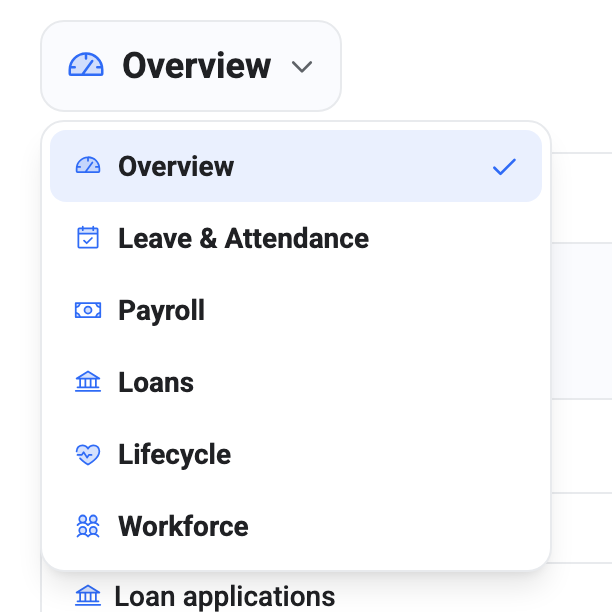
What each one is for
| Dashboard | Answers |
|---|---|
| Overview | What needs me today? |
| Leave & Attendance | Who’s off, who’s late, what does the month look like? |
| Payroll | What are we spending, and on what? |
| Loans | What’s lent out, and what’s coming back? |
| Lifecycle | Who’s joining, moving and leaving? |
| Workforce | Who works here? |
Overview is the odd one out and the one you’ll use most. It’s an action centre — things waiting on you, today’s state, the next fortnight — rather than an analysis surface. The other five are read-only analytics over one subject area. See The Primary Dashboard.
You can’t build your own or rearrange the widgets. The six are curated, and the widget layout is fixed.
Your list may be shorter
Each dashboard is gated on a permission, and one you can’t see isn’t listed:
| Dashboard | Needs |
|---|---|
| Overview | nothing — everyone gets it |
| Leave & Attendance | view requests |
| Payroll | create pay runs |
| Loans | read loan applications |
| Lifecycle | view HR health |
| Workforce | view employees |
Individual widgets gate themselves too. So two people can open the same dashboard and see a different number of cards — a manager without payroll analytics sees the Payroll dashboard minus the salary widgets, not a refusal. That’s the same permission model as everywhere else, described in Roles and Access.
Overview has no gate of its own, which is why everybody lands somewhere even with minimal permissions.
It remembers where you were
Your last dashboard is stored in the browser, so Dashboard in the sidebar returns you to it rather than to Overview. It’s per-browser, not per-account — sign in somewhere else and you start at Overview again.
Don’t bookmark a dashboard
Deep links to non-primary dashboards don’t currently work. Open
/dashboards/payroll directly — from a bookmark, a pasted link, or by
refreshing the page while you’re on it — and you land on Overview instead.
The cause is a timing one: the page checks your permissions before they’ve finished loading, decides you can’t see the dashboard, and redirects. Nothing is wrong with your access, and the switcher works perfectly.
The workaround is the switcher. Go to the dashboard area, then pick from the dropdown — that route never touches the check that fails.
Worth knowing if you were planning to circulate a link to a dashboard in a handover document. Link people to the product and tell them which dashboard to pick.
Reading any of them
Two conventions hold across all six:
Open → in a widget’s corner takes you to the screen the numbers came from. The dashboards are entry points, not destinations — every figure is a link back to the records behind it.
An empty widget usually explains itself. Widgets that need history rather than data say so — “Trend builds as monthly headcount snapshots accumulate (needs ≥2 months)” is a new account waiting for time to pass, not a fault. A widget reading zero is a real zero; a widget with a sentence in the middle is telling you what it’s waiting for.