
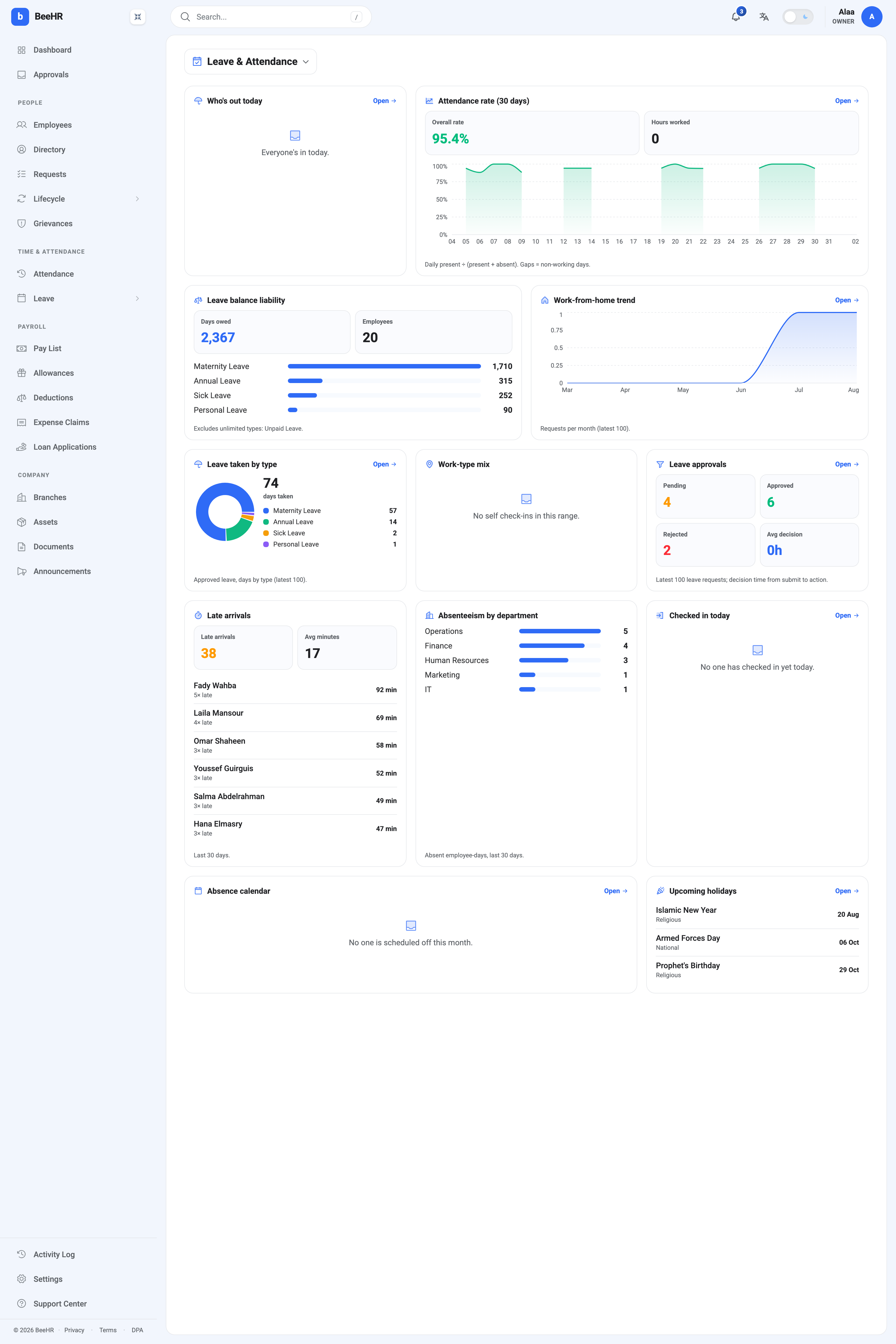
The Leave & Attendance dashboard covers time: who is in today, who has been late, who is owed leave, and how quickly requests get decided. Twelve widgets, most of them looking back thirty days.
Leave balance liability
Days owed is the accrued leave your people could take but haven’t — 2,367 days across 20 employees here, broken down by leave type.
It’s the one number on this dashboard that belongs in a financial conversation rather than an operational one. Unused leave is a commitment: it will either be taken (and covered) or, in many places, paid out when somebody leaves. A figure that grows quarter on quarter is a liability accumulating quietly.
Two things about how it’s counted:
Unlimited types are excluded, and the card says so — Excludes unlimited types: Unpaid Leave. A type with no quota can’t accrue a balance, so it can’t be owed.
One type can dominate. Maternity leave is 1,710 of the 2,367 days here, which is a large statutory entitlement sitting on a handful of records rather than a backlog anybody plans to take. Read the breakdown before quoting the headline — the annual-leave line (315 days) is usually the one that reflects real operational exposure.
Balances themselves are managed in Leave Balances and Quotas.
Attendance rate
Attendance rate (30 days) gives an overall percentage and a daily chart, and its footnote is the definition: daily present ÷ (present + absent). Gaps = non-working days.
That denominator matters. Days with no record at all aren’t counted either way, so a month where half the company never had attendance logged still reads a healthy percentage over the days that were. The rate measures the days you have data for, not the days that happened. The Monthly Attendance Grid explains why a dash is not an absence.
Hours worked reads 0 whenever check-in and check-out times aren’t being captured — it needs clock times, not just a Present marker.
Today’s cards
Who’s out today and Checked in today are the live pair, and both are honest empty states rather than faults: “Everyone’s in today” means no approved leave covers today, and “No one has checked in yet today” is what a morning looks like before people clock in.
Absence calendar — “No one is scheduled off this month” — reads approved future leave. An empty one in a month you expected holidays in usually means requests were approved but the dates fall outside the month, not that nobody is off.
Lateness and absence
Late arrivals is the most pointed card here: a count, an average, and a named list — Fady Wahba 5× late, 92 minutes total. It reads the lateness recorded against attendance entries, which depends on shifts being assigned; somebody with no shift has no expected start time and so can never be late. See Assigning Shifts, Lateness and Overtime.
Absenteeism by department counts absent employee-days over the last thirty, which is the fairer comparison across teams of different sizes than a raw count of people. Use it to spot a pattern, then open the grid for the individual days — a department with five absent days spread over five people is a different situation from one person absent all week.
Requests and remote work
Leave approvals shows Pending, Approved and Rejected over the latest 100 requests, plus average decision time from submission to action. The pending count is the actionable one; the decision time is the one to watch if people complain that requests sit. See The Approvals Inbox.
Leave taken by type breaks down approved leave in days, which is the natural companion to the liability card — what’s been used against what’s owed.
Work-from-home trend plots WFH requests per month. Work-type mix reads self check-ins, and shows “No self check-ins in this range” when nobody is clocking in from the app — that card depends on the employee app being in use, not on any setting here.
Upcoming holidays
The next public holidays with their type, drawn from the holiday calendar. Worth a glance before committing to a deadline; the calendar itself is in Public Holidays.
Note that a holiday appearing here does not mark itself on the attendance grid — that remains a deliberate two-step, and the grid article explains why.
What it can’t do
No filters, no date range, no department picker. The windows are fixed at 30 days or the latest 100 records, and everything is scoped to what your role can see. For anything narrower, use the filters on the attendance grid or the leave balance report and export from there.