
Activity Log is the account’s audit trail: every recorded action, newest first, written as a sentence. It’s where you go when the question is who did this, and when?
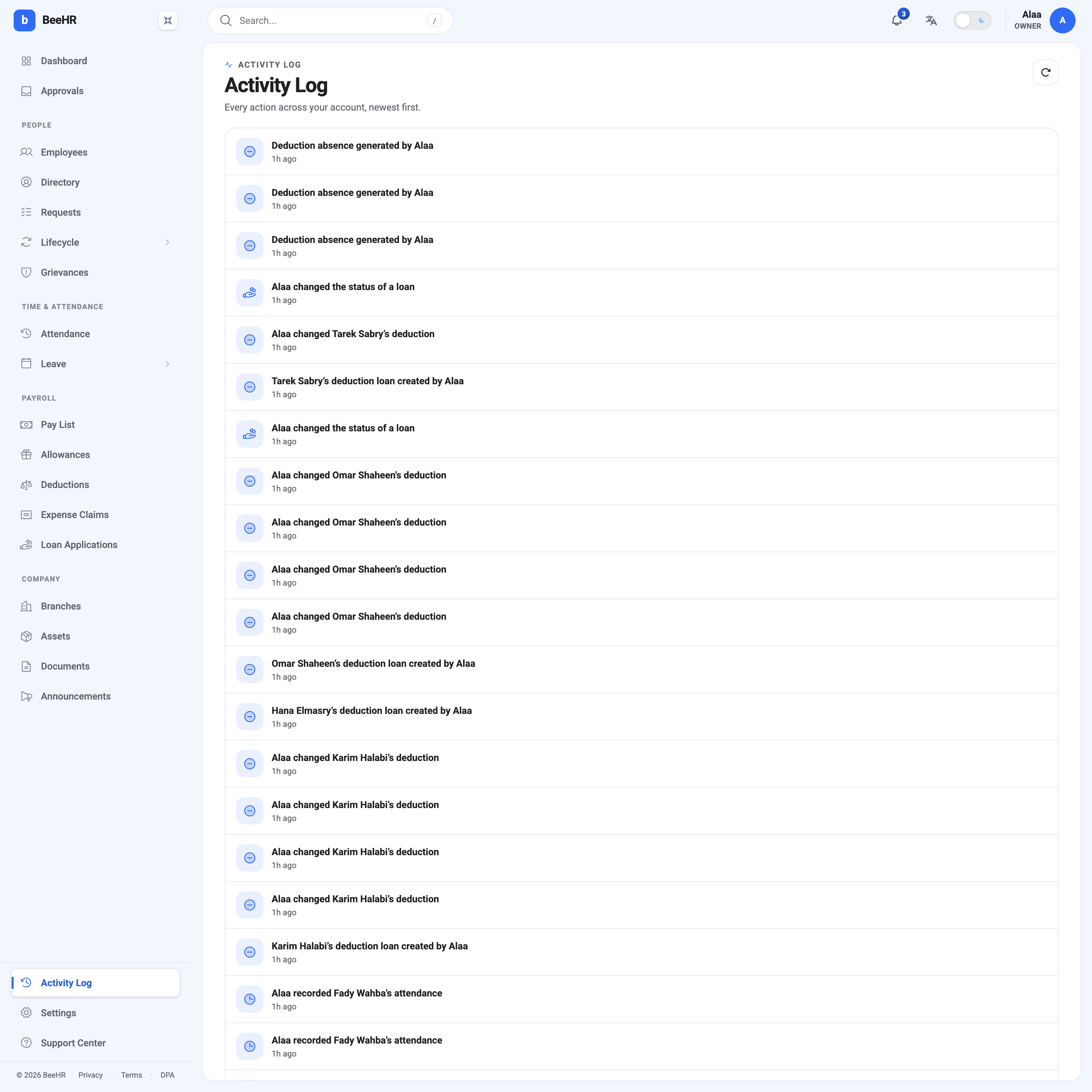
What a line tells you
Three things, and no more: who acted, what they did, and when.
The sentences are written to be read rather than parsed — “Alaa changed Omar Shaheen’s deduction”, “Hana Elmasry’s deduction loan created by Alaa”. Where an action was about a specific person, that person is named, which is what makes the log searchable by eye.
Timestamps are relative — 1h ago — which is right for recent activity and less useful once you’re looking weeks back.
The icon on the left indicates the module, so a burst of the same icon is one person working through one area. In the shot above, a run of deduction and loan icons is exactly that: a batch of loans being set up in one sitting.
What gets recorded
Anything that changes data through the product: creating and editing records, status changes, approvals, generated batches, attendance entries. Actions made by automation are attributed too — the absence generator’s rows appear as “Deduction absence generated by” the person who pressed the button, not as an anonymous system event, which is the right attribution since somebody chose to run it.
What the log is not is a change diff. It records that a deduction was changed, not what it changed from and to. For that level of detail you need the record itself — pay records keep a full field-level Edit History with before, after and the reason, and that is the better source when the question is about a specific number rather than a specific person.
What it can’t do yet
Worth knowing before you rely on it in an investigation:
There is no search and no filters. No by-person, by-module, by-date-range or free-text search. The log is one reverse-chronological list, and finding something from three weeks ago means scrolling to it.
There is no export. Nothing to hand an auditor as a file.
Relative timestamps only. 1h ago is convenient now and imprecise later.
So the log is well suited to “what has been happening lately?” and poorly suited to “prove what happened on the 14th”. If you need the second, capture what you need while it’s still near the top, and lean on the record-level history where it exists.
The refresh button at the top right re-reads the list — the page doesn’t stream new events on its own.
Where else activity shows up
The Primary Dashboard carries a Recent activity card with the last few entries, which is enough for a morning check. This page is the full list behind it.
Some modules keep their own, richer trails that this log doesn’t replace:
- Pay records — field-level edit history with reasons.
- Grievances — a case timeline, deliberately separate because confidentiality rules mean not everyone who can see this log should see case activity.
- Requests — each request carries its own decision history.
If an action seems missing from the Activity Log, the module’s own record is worth checking before concluding it wasn’t recorded.