
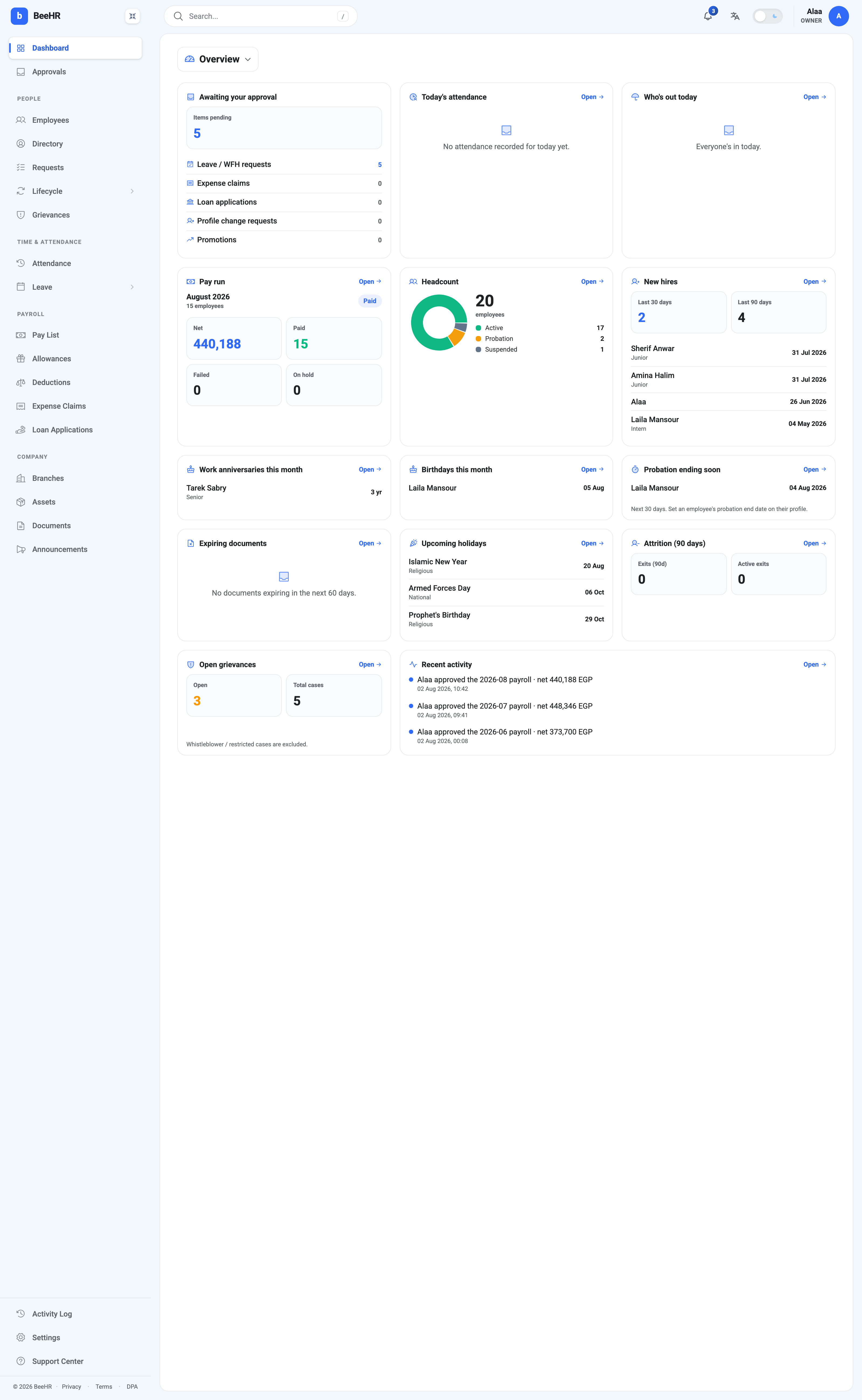
Overview is where BeeHR opens, and it’s the only dashboard built for doing rather than analysing. Fourteen cards, arranged roughly in order of urgency: what’s waiting on you, what’s true right now, and what’s about to happen.
What’s waiting on you
Awaiting your approval is the most useful card on the screen and the reason Overview is the default. It totals everything queued for a decision by you, then breaks it down by kind — leave and WFH requests, expense claims, loan applications, profile change requests, promotions.
Read the breakdown, not just the total. Five pending items that are all leave requests is a different afternoon from five spread across five modules.
Each line links to its own queue. The full approval workflow is in The Approvals Inbox.
What’s true right now
Today’s attendance and Who’s out today are the two live cards, and both read as empty states here for honest reasons.
“No attendance recorded for today yet” is what a morning looks like before anyone clocks in — it isn’t a fault. “Everyone’s in today” means no approved leave covers today.
Note the asymmetry, because it catches people out: Who’s out reads approved leave, while Today’s attendance reads the grid. Somebody on approved leave whose grid cell was never set shows as out here and as a dash there. The two disagreeing is a signal to reconcile, and The Monthly Attendance Grid explains why.
Pay run shows the current month’s run — August 2026, Paid, 15 employees, 440,188 net. It always reads the calendar month, not the last month you generated, so a month you haven’t run yet reads empty here even if last month’s run was perfect.
Headcount splits your people by employment status: 17 Active, 2 on Probation, 1 Suspended. It counts everybody on the books, so it’s the number to reconcile against when a pay run covers fewer people than you expected — see How Payroll Works for who ends up in a run.
What’s coming
Five cards look forward, and they’re the ones that quietly earn their keep, because nothing else in BeeHR will remind you:
New hires — arrivals in the last 30 and 90 days, with names and start dates.
Work anniversaries and Birthdays — this month, with the milestone.
Probation ending soon — the next 30 days. This one has a real deadline attached: a probation period that lapses without a decision has effectively made the decision. The card notes that it reads the probation end date on the employee’s profile, so somebody without that date set will never appear here.
Expiring documents — the next 60 days. Reading “No documents expiring” on an account with no documents means nothing is being watched, which is not the same as nothing being due.
Upcoming holidays — the next public holidays with their type. Useful before committing to a delivery date.
The bottom row
Attrition (90 days) counts exits in the last quarter and exits currently in progress. Both read zero on an account that has never off-boarded anyone.
Open grievances shows open and total cases, with a footnote worth reading: whistleblower and restricted cases are excluded. The count here is deliberately not the whole picture — confidentiality outranks completeness. See How Grievances Work.
Recent activity is the last few audited events across the account, in plain sentences. It’s a preview of The Activity Log, which holds the searchable version.
Reading it well
Overview is a morning screen. The habit that gets value from it:
- Awaiting your approval — clear the queue, or at least know its shape.
- Today’s attendance and Who’s out — check they agree with each other.
- Probation ending and Expiring documents — the two with deadlines nothing else tracks.
Everything else is context you’ll notice without looking for it.