
A pay run is a snapshot, not a live calculation. When you generate one, BeeHR reads everybody’s salary, everybody’s approved allowances and deductions, and the tax rules as they stand at that moment, works out the arithmetic once, and writes the answer down. Change a salary tomorrow and last month’s run is unaffected — which is the whole point, because it has already been paid.
Everything lives under Payroll → Pay List, one month at a time.
The four inputs
Each row is built from four things, pulled from four different places.
Basic salary comes from the employee’s Compensation tab — not from their bank record, and not from anything typed into payroll. If somebody’s pay looks wrong, that tab is where it is wrong. See Compensation: Salary and Its History.
Allowances are additions for that month: transport, housing, a bonus. Only rows with the status Approved are counted.
Deductions are subtractions for that month: an absence, damaged equipment, a penalty. Again, Approved only.
Tax and insurance are rules, not per-person figures. They live in Settings → Payroll Settings and apply to everyone in the run, either as a flat amount or as a percentage.
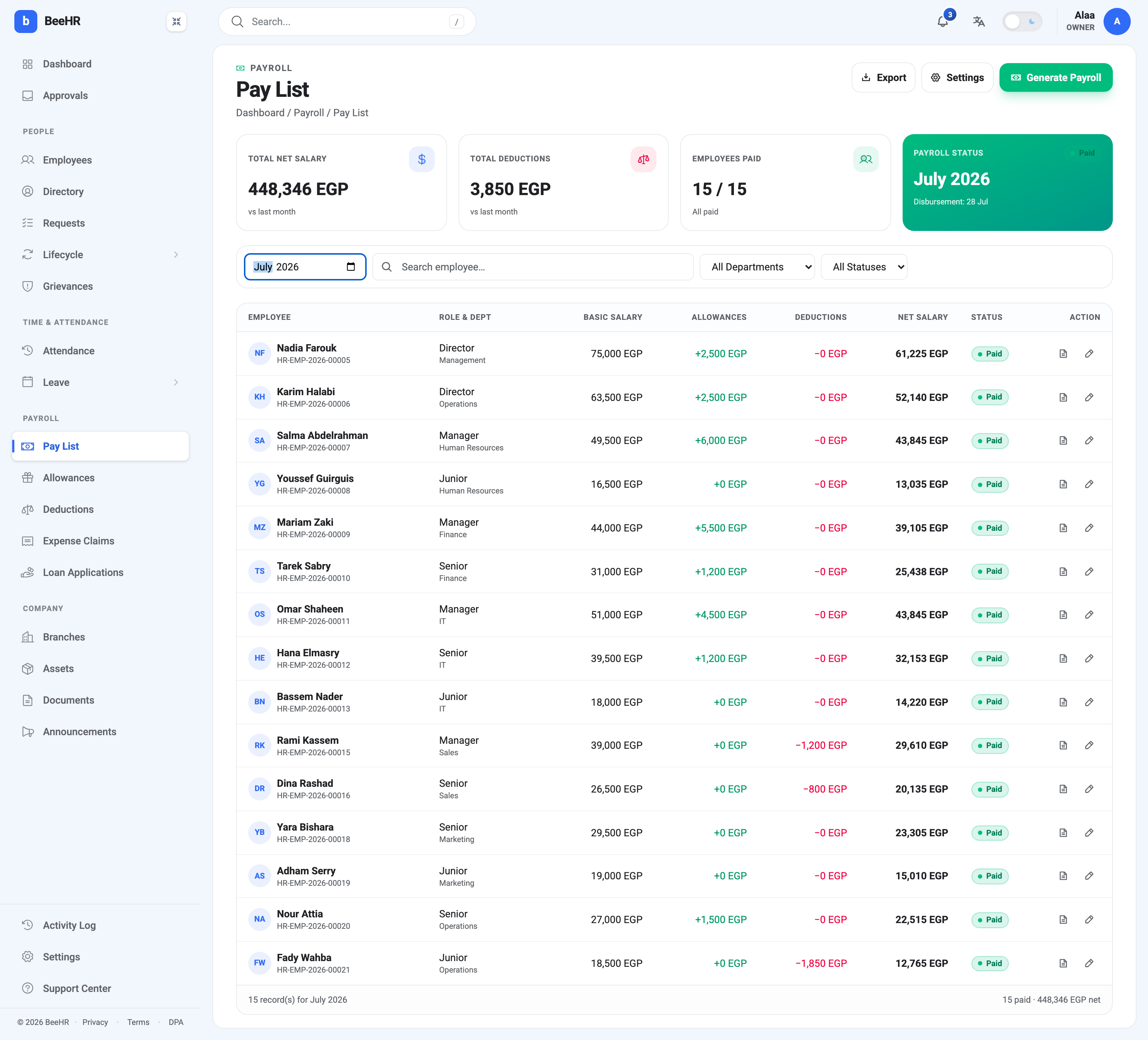
That Approved-only rule is worth seeing rather than being told. In the July run above, Yara Bishara’s allowances column reads +0 EGP — she has an 1,800 EGP transport allowance for July, but it was still sitting at Pending when the run was generated, so it wasn’t picked up. It didn’t fail; it simply wasn’t approved yet. Approving it now does nothing to that run either. It would need a new one.
How the arithmetic runs
Take Nadia Farouk’s row:
| Basic salary | 75,000 |
| Approved allowances | + 2,500 |
| Gross | 77,500 |
| Tax, at 10% | − 7,750 |
| Insurance, at 11% | − 8,525 |
| Approved deductions | − 0 |
| Net salary | 61,225 |
So: gross is basic plus allowances, and net is gross minus deductions, tax and insurance. Net can never go below zero — a month of deductions larger than the salary lands at 0, not at a negative figure.
One wrinkle worth knowing about. Tax and insurance are worked out on the taxable part of gross, which is not always all of it. An expense reimbursement paid through payroll is money being given back, not income, so it raises gross and net but is left out of the tax base. Ordinary allowances — transport, housing, bonuses — are all taxable, so for most rows the two figures are the same.
Who ends up in a run
Two things have to be true before BeeHR will pay somebody, and both are silent requirements rather than errors on a form.
- They have a salary. No compensation record, no figure to pay.
- They have a primary bank account. Pay can be calculated without one, but it can’t be disbursed, so the run leaves them out.
Anyone missing either is skipped: not paid, not counted in the totals, and listed with a reason in the preview step before you generate. That preview is the moment to catch it, and it is the only warning you get.
Employment status matters too. A run generated for Active employees covers people who are Active or on Probation; choosing All employees adds Suspended staff as well. Leavers are in neither.
This is why the July run above says 15 / 15 in a company of twenty. Three people have no salary on record, one has no bank account yet, and one is suspended. Nobody is broken — those five just aren’t payable this month.
One live run per month
A month holds a single run at a time. Until you generate it, the month is empty and the tiles read zero.
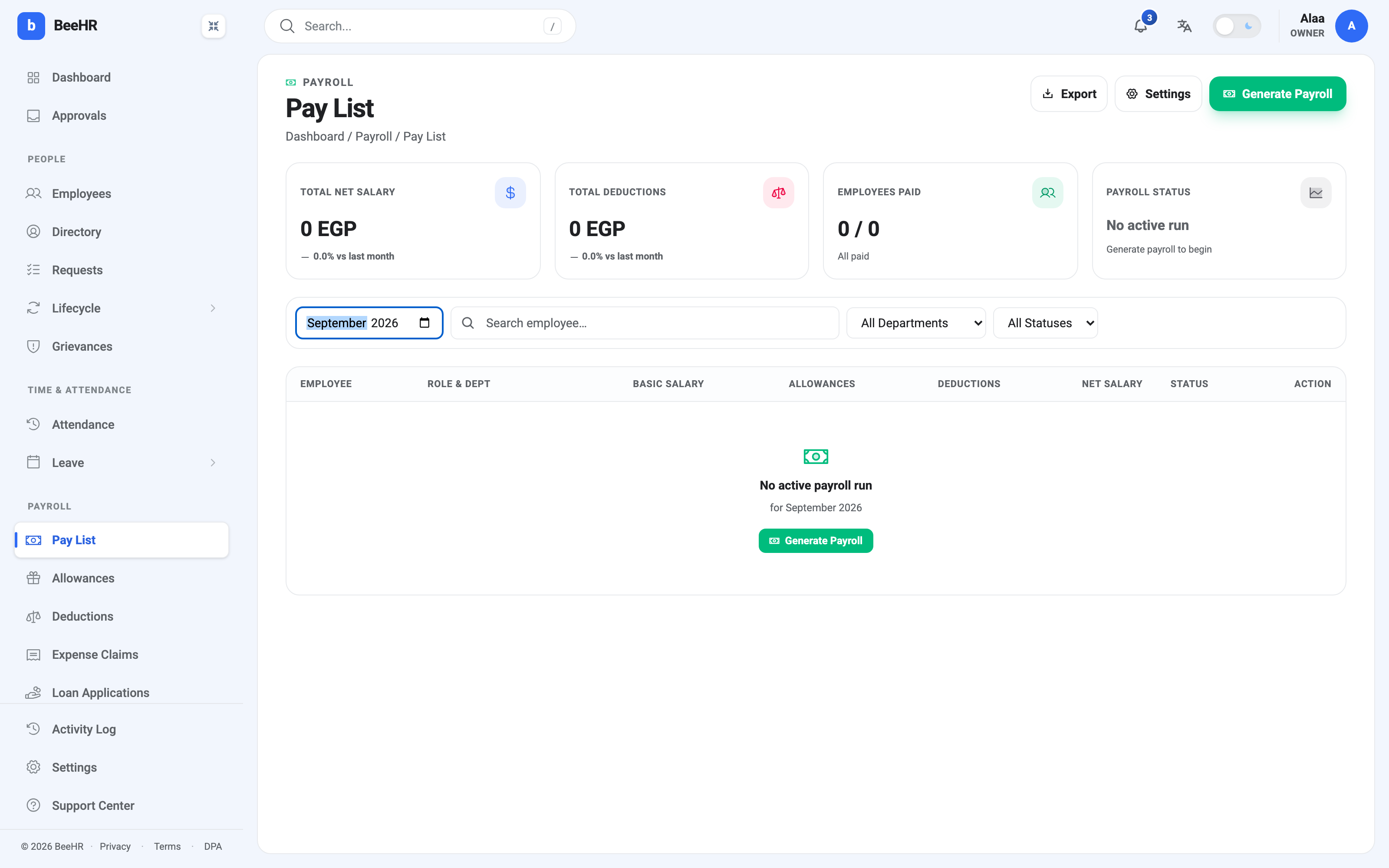
Try to generate a second run for a month that already has one and BeeHR refuses. To redo a month, you cancel the existing run first, which frees the month up — but only while it is still cancellable. Once a run is Paid, nothing can undo it.
The lifecycle
A run moves through a fixed sequence, and the Pay List shows a banner with the buttons for whichever stage it is at:
Pending Approval — where every new run lands. Generating payroll doesn’t pay anyone; it prepares the numbers for somebody to check. Approve and Reject live here.
Approved — checked and cleared, waiting for the money to actually move. BeeHR does not transfer funds; your bank does. Mark as Paid is how you tell BeeHR the transfer happened.
Paid — final, and genuinely final. A paid run can’t be edited, cancelled or reopened. Corrections are made in the next month.
Cancelled — the dead end for anything that didn’t make it. Note that rejecting a run cancels it rather than sending it back for edits: there is no “returned for changes” state. Fix whatever was wrong in the underlying data and generate the month again.
What payroll does not do
It does not move money. Every status in BeeHR is a record of a decision, not a bank instruction. The actual transfer happens in your banking system, and Mark as Paid is you telling BeeHR it’s done.
It does not deduct absences by itself. Attendance and payroll are separate records, and an unpaid day on the attendance grid does not become money until somebody turns it into a deduction. There is a tool that builds those from attendance rather than leaving you to work them out by hand.
It does not backfill. A raise entered today, even backdated, will not reissue a run that has already been paid. The difference is settled separately, usually as an allowance on the following month.