
Once a run is paid, its records become history. There are two ways into them, and which one you want depends on whether you are asking about a month or about a person.
For a month, open the Pay List and pick it in the month picker — that gives you everybody who was paid, in one table.
For a person, open their record and go to the Pay history tab.
The Pay history tab
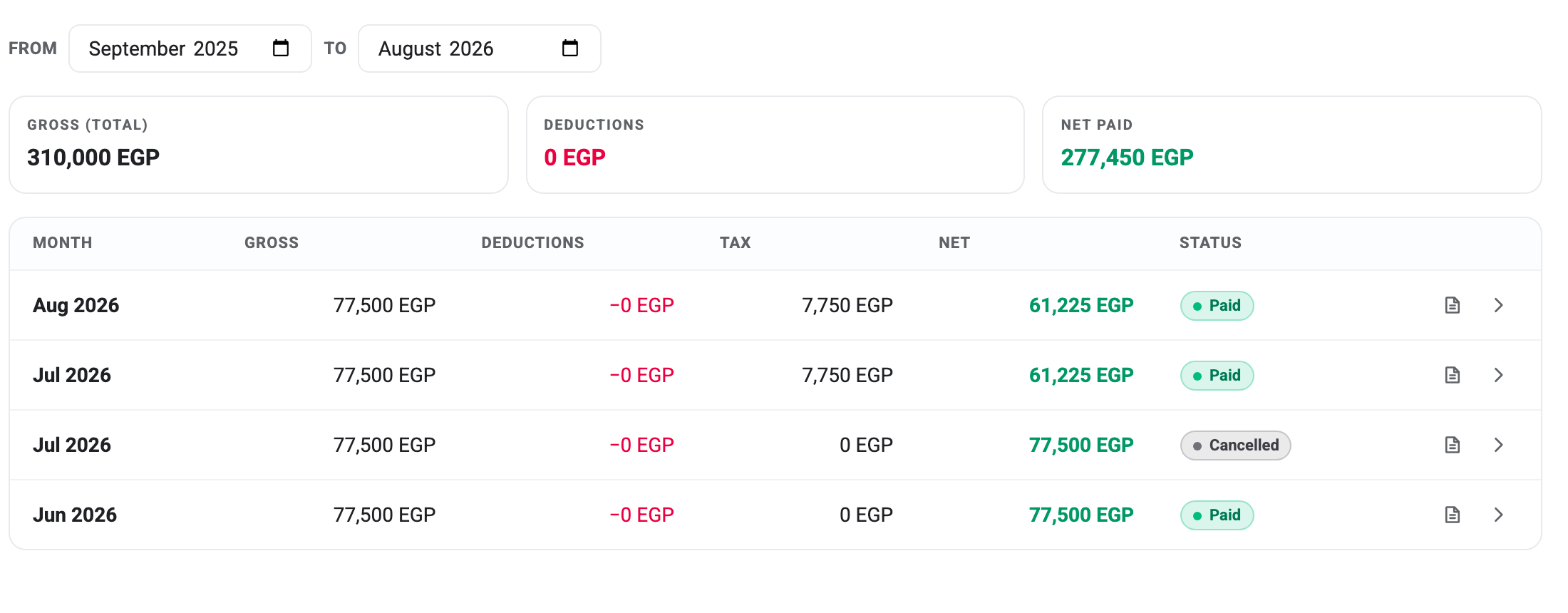
Each row is one month’s record: Gross, Deductions, Tax, Net and the record’s status. The two icons at the end download that month’s payslip and jump to the run it came from.
The From and To boxes control the range, and they are the fix for most questions this screen raises — a full year is the default, but a single month or a whole employment is a couple of clicks.
Read the status column before the totals
The three tiles above the table add up every row in the range, whatever its status. Cancelled records are included.
In the screenshot that matters. Net Paid reads 277,450 EGP, but one of those four rows is a cancelled July run worth 77,500 — money that was never paid to anybody. The figure actually paid is 199,950.
So if you are reconciling against a bank statement, check the status column first, or narrow the range to exclude anything cancelled. A cancelled record is kept on purpose — it is part of the trail of what happened that month — but it is not money.
Why an old month can look different
Two rows in that table have a tax of 0 and two don’t, on the same salary. That isn’t an error. A pay run snapshots the tax and insurance rules in force on the day it was generated, and those rules changed between June and July. The older records keep the older figures for good.
The same is true of everything else on a record. Somebody’s basic salary here is what they were earning that month, not what they earn now.
The payslip
The download icon builds a payslip as a PDF and saves it. There is no payslip screen to look at first, and nothing is stored — the file is generated from the record at the moment you ask for it.
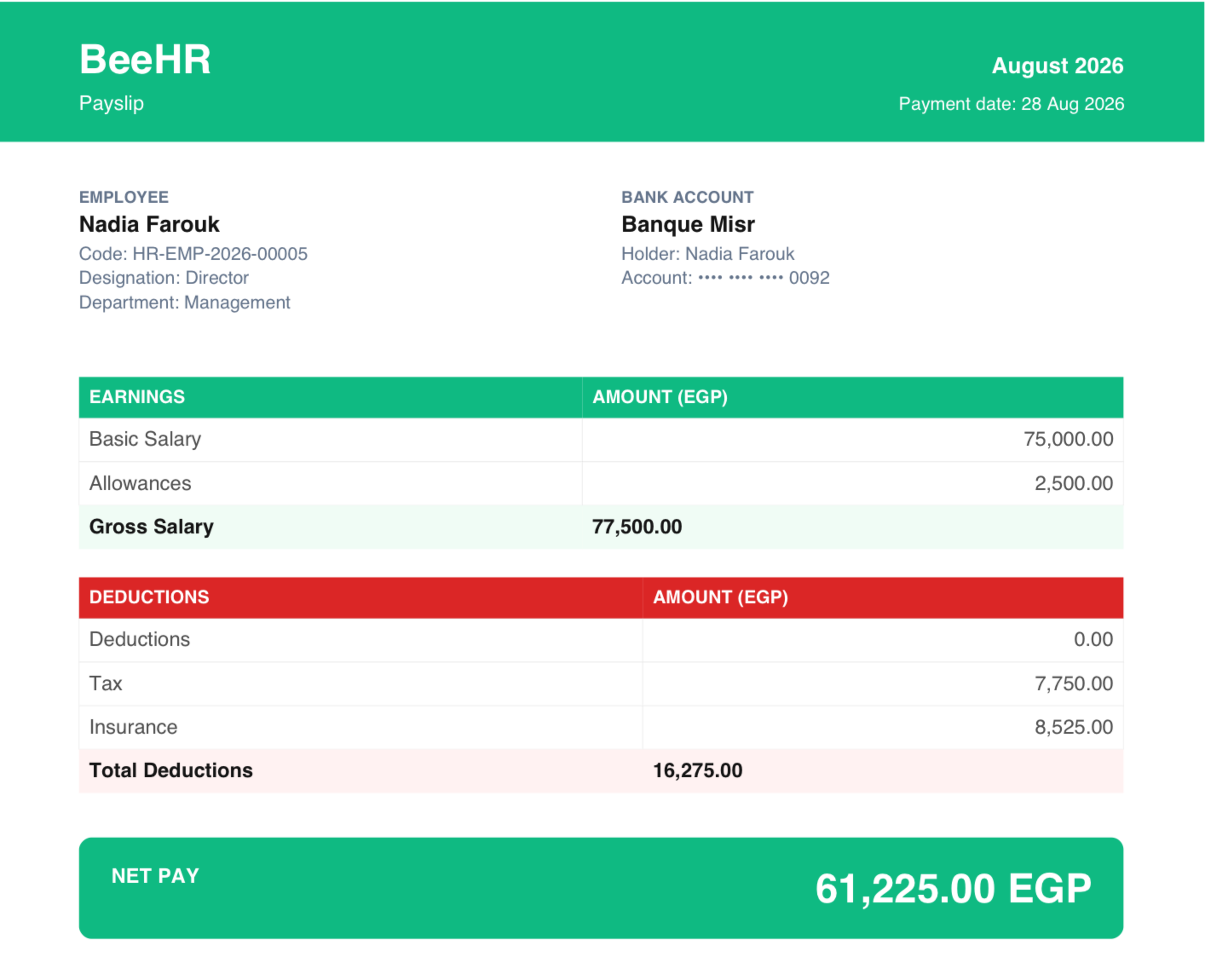
It carries the month, the employee’s name, code, designation and department, and the bank account the pay was destined for — masked to the last four digits, so a payslip can be forwarded without exposing an account number.
Then the arithmetic, split the way How Payroll Works describes it: earnings up to a gross figure, then deductions, tax and insurance down to net pay.
Because the file is built from the record rather than kept from the run, a payslip reflects any edit made before approval. Download it again after a correction and the new figures are on it.
One small inconsistency to know about: the payslip’s Payment date is the date the run was scheduled to pay when you download from the Pay List, but the date the run was actually marked as paid when you download from the Pay history tab. The money figures are identical either way.
What employees see
The BeeHR app shows people their own pay history, and it is not the same view as this one. Their list is filtered to finalised records only — anything from a run that was cancelled, or that hasn’t been approved yet, is hidden.
That is worth knowing when somebody says their app doesn’t show a month you can see on this tab. If the run was cancelled, or is still sitting at Pending Approval, that is the expected behaviour rather than a fault.
Getting a whole month out
For anything wider than one person, use Export on the Pay List rather than downloading payslips one at a time. It takes the run out as a file covering every employee in it, which is what a bank or an accountant usually wants.