
A deduction is the mirror of an allowance: money taken off one person’s pay for one month. Same shape, same statuses, same approved-only rule. It lives at Payroll → Deductions.
The difference is what’s at stake. Nobody complains about an allowance that was entered wrongly in their favour. A deduction is a sentence with a number attached, and the screen is built around that — which is why it has a dispute route, why approved rows can’t be deleted, and why the reason field earns its place.
Why the total reads zero
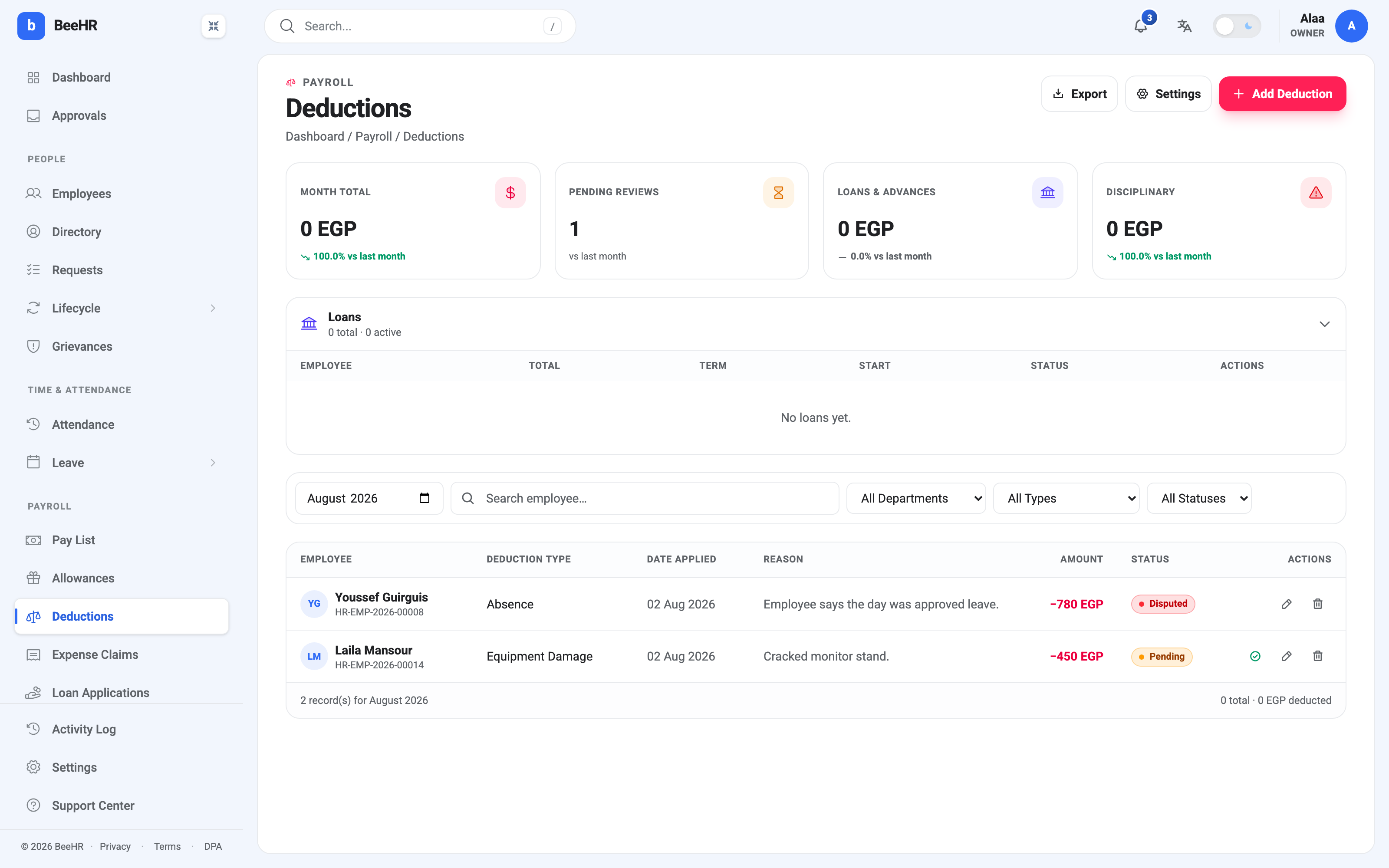
There are 1,230 EGP of deductions on this screen and Month Total says 0 EGP. That is correct. One row is Disputed and the other is Pending, and deductions — like allowances — only count once they are Approved.
Until somebody approves them, nothing is coming off anyone’s pay. The footer agrees: 0 total · 0 EGP deducted.
The other three tiles:
Pending Reviews is a count, not an amount. It is the number of rows waiting on a decision, and it’s the one tile to glance at before a pay run — a pending deduction is a decision you haven’t made yet, and generating payroll makes it for you by leaving it out.
Loans & Advances totals approved Loan Repayment rows for the month.
Disciplinary combines Disciplinary Penalty and Equipment Damage into one figure, on the reasoning that both are money taken off somebody for something that went wrong rather than for a routine reason.
The four types
| Type | What it’s normally for |
|---|---|
| Absence | Unpaid days |
| Loan Repayment | An installment against a company loan or advance |
| Disciplinary Penalty | A fine under company policy |
| Equipment Damage | Company property broken or lost |
As with allowances, the type does no arithmetic — it drives the tiles, the filters and your export. Unlike allowances, two of these types usually shouldn’t be typed in by hand at all, which is the next section.
Two types you mostly shouldn’t create manually
Absence deductions have a generator. It reads the month’s attendance, works out what each unpaid day is worth against a daily-rate divisor, and writes the rows for you. It does not live on this page — it’s on the Attendance screen, because that’s where the data it reads lives. See Automatic Absence Deductions.
Typing absence deductions in manually works, but you’re doing arithmetic BeeHR would do more consistently, and the rows won’t be traceable back to the days that caused them.
Loan Repayment rows are installments, and they come from a loan. The Add Deduction sheet has a second mode for this — the Loan / Advance tab beside One-time — which asks for a total, a number of installments and a start month, then creates the whole schedule at once rather than one row a month. The Loans panel at the top of the page is where those schedules are tracked. Loans and Installment Deductions covers it properly.
That leaves Disciplinary Penalty and Equipment Damage as the two you genuinely do enter by hand.
Adding one
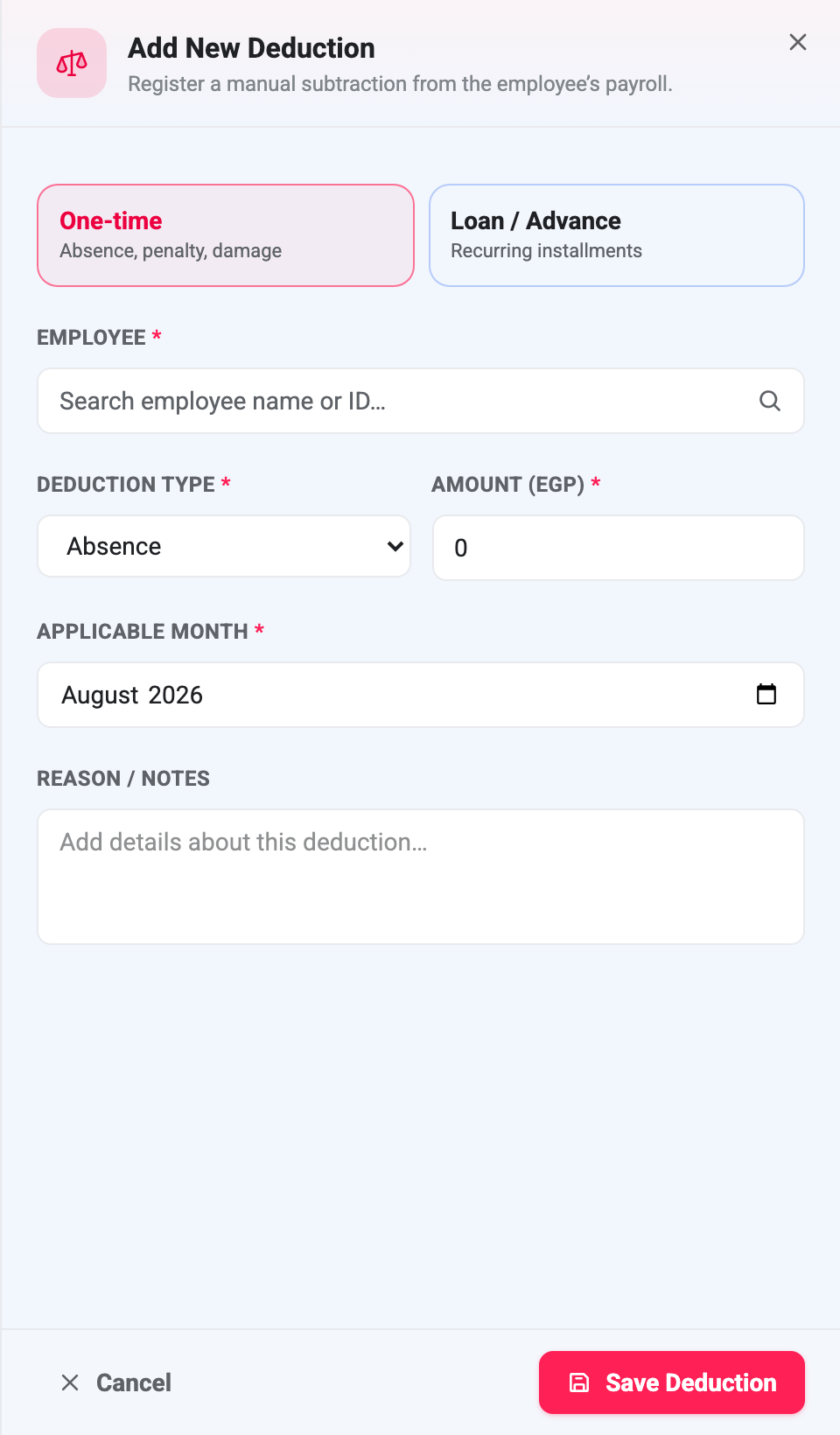
The fields match the allowance sheet. Applicable month is the month the money comes off, not the day you’re entering it, and it’s what decides which pay run picks the row up.
Reason / notes is technically optional and practically not. It is what the employee is shown when they query the deduction, and “Cracked monitor stand” does a job that a blank field does not. Write it as though the person it’s about will read it, because they will.
New rows land as Pending. Nobody can create a pre-approved deduction, including against themselves.
Approving and disputing
A Pending row shows a green tick, which approves it outright — no dialog, no comment. The tick appears only for people holding the approve deductions permission, which is separate from the permission to create one. Creating a deduction notifies an approver, drawn from the chain in Payroll Settings and Approval Chains.
The three statuses work exactly as they do for allowances:
Pending → Approved or Disputed, and Approved ↔ Disputed can be flipped as often as needed. Nothing returns to Pending.
Disputed is doing real work here. Youssef Guirguis’s absence deduction in the screenshot says “Employee says the day was approved leave” — that is a deduction that may well be wrong, and the right thing to do with it is take it out of the arithmetic while somebody checks the leave records, without deleting the fact that it was raised. If the leave turns out to be approved, the row stays Disputed and no money moves. If it doesn’t, the row is approved and it does.
Because a disputed row is worth zero, a dispute costs the employee nothing while it’s being resolved. There is no need to rush a decision to be fair to them.
Approved deductions can’t be deleted
The bin refuses on an approved row:
Approved deductions cannot be deleted; dispute them instead.
An approved deduction may already have come off a payslip, and deleting it would leave the money missing with nothing on record to explain it. Disputing removes it from the count and keeps the trail. Pending and Disputed rows delete cleanly.
The same warning as on the allowances side applies to editing: changing the amount on an approved deduction leaves it approved. Nobody re-approves it and nobody is notified. If a figure moves after it has been signed off, dispute the row and raise a new one.
What a deduction can’t do
It can’t push somebody into negative pay. Net is floored at zero. A month of deductions larger than the salary produces a net of 0, not a debt, and the excess doesn’t roll forward — if you need it recovered over time, that’s a loan, not a deduction.
It can’t reach into a pay run that already exists. Approving a deduction after a run was generated does nothing to that run. It’s a snapshot, as described in How Payroll Works. While the run is still Pending Approval you can put the figure on the pay record by hand; after that, it waits for next month.
Money going the other way is Allowances.