
Somebody borrows 24,000 EGP from the company and pays it back over six months. You could type a 4,000 EGP deduction into each of the next six months and hope nobody forgets one. A loan is BeeHR writing all six at once and keeping track of what’s left.
It lives on Payroll → Deductions, because that’s what a loan is from payroll’s point of view: a deduction that arrives in installments.
Not the same thing as Loan Applications. The Loan Applications module is where an employee asks for a loan and somebody approves the request. What’s described here is HR recording a loan that has already been agreed and setting up its recovery. The two are separate records, and creating one does not create the other.
Creating one
Add Deduction, then switch the mode at the top of the sheet from One-time to Loan / Advance.
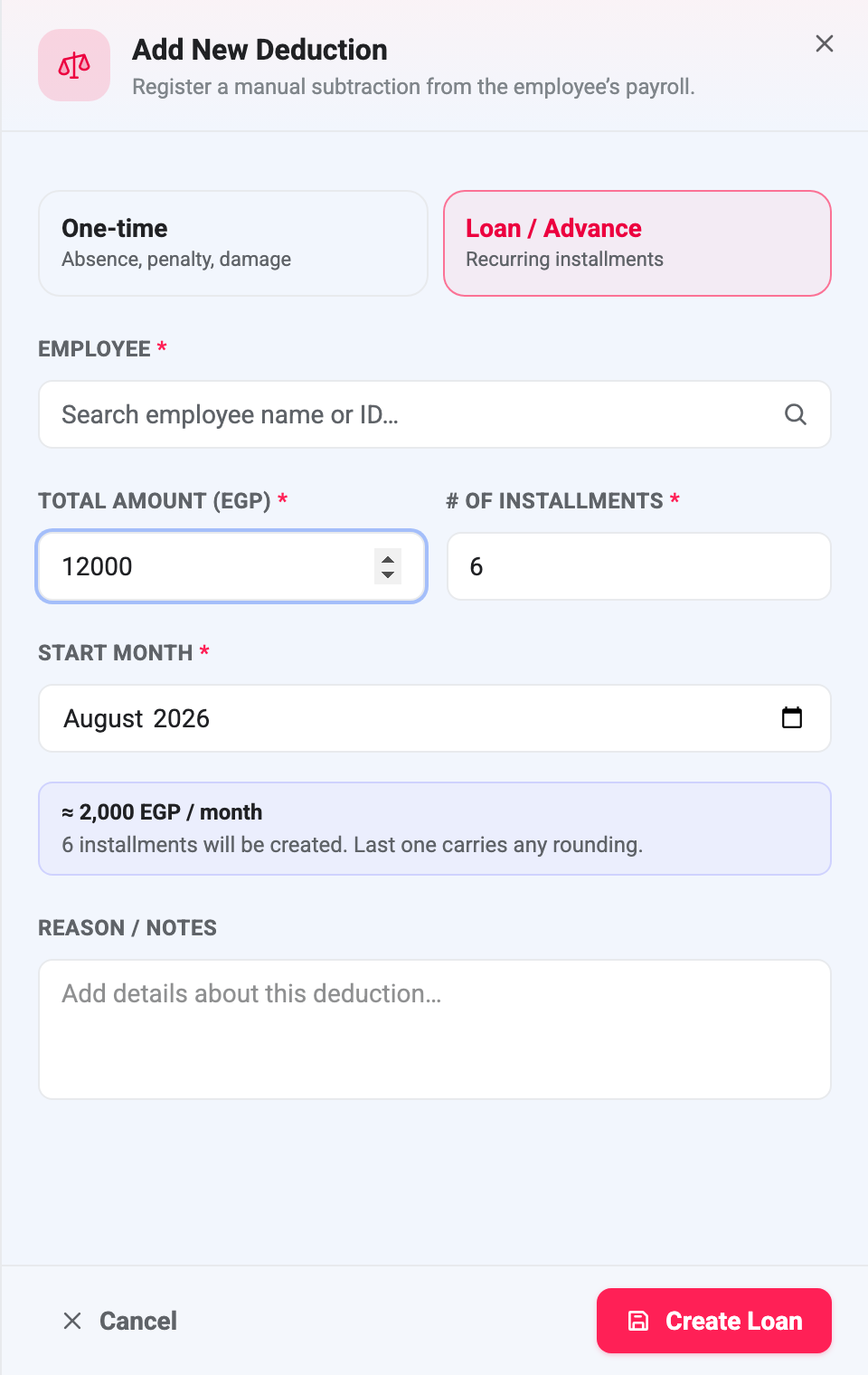
Four things decide the schedule: the employee, the total amount, the number of installments (up to 60), and the start month. There is no interest rate and no fee — BeeHR recovers exactly what was lent.
The preview panel does the division for you and warns about the part people get wrong: the last installment carries the rounding. A 10,000 EGP loan over three months is 3,333.33 twice and 3,333.34 once, not three equal payments. The schedule always sums to the total to the penny, and it does that by putting the odd fraction at the end rather than spreading it.
Press Create Loan and BeeHR writes, in a single transaction, one loan record plus one Loan Repayment deduction for each month, running consecutively from the start month. Either all of it is written or none of it is — a half-created schedule isn’t possible.
Loans can’t be created for terminated employees.
The installments are ordinary deductions
This is the part worth internalising. The rows the loan creates are normal deduction rows, in the normal Deductions table, with the normal Pending status. They are not special, and nothing about them is automatic.
Which means each installment still has to be approved, month by month, before payroll will touch it. Creating a six-month loan does not authorise six months of deductions; it queues up six decisions. If nobody approves October’s installment, October’s pay run recovers nothing and the loan simply doesn’t progress that month.
You can spot them in the deductions list by their type, Loan Repayment, and their reason, which reads “Loan installment 3 of 6” unless you wrote your own.
Editing one is deliberately limited. Open an installment and BeeHR tells you what it is — Loan installment 3/6 — and lets you change the amount and the reason only. The type and the month stay locked, because moving one row of a series would quietly desynchronise the schedule from the loan it belongs to. There is no way to edit a loan as a whole: adjustments are made row by row.
The Loans panel
Every loan on the account is listed at the top of the Deductions page, above the month filter — so unlike everything else on the screen, this panel is not month-scoped.
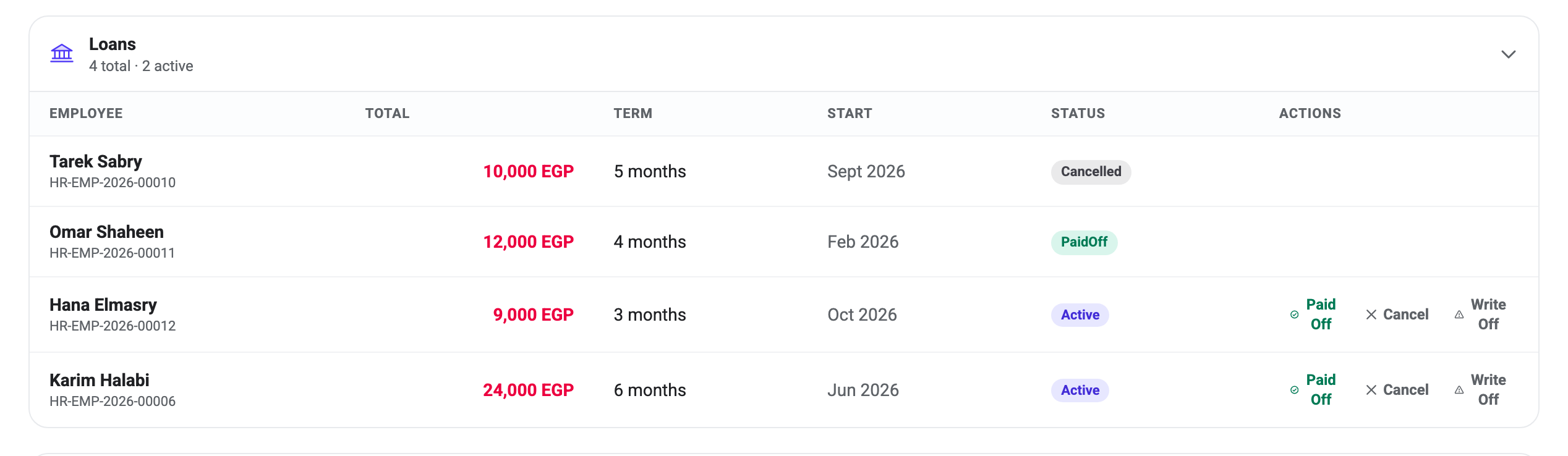
The columns describe the loan as agreed — total, term and start month — and they never change afterwards, even when the schedule underneath them does. Tarek Sabry’s row still says 10,000 EGP over 5 months although the loan was cancelled and only one installment survives. That is the record of what was arranged, not a progress bar.
What “repaid” counts
A loan’s progress is the sum of its Approved installments. Nothing else enters into it.
Karim Halabi’s loan is 24,000 over six months from June. Four installments have been approved, so the loan reads 16,000 repaid, 8,000 remaining, and it will close when the last two are approved too.
Note what that does not depend on: whether a pay run has actually gone out. Approving an installment marks it recovered as far as the loan is concerned, even if the month it belongs to has not been generated yet, or was generated before the installment existed. In ordinary use the two line up, because you approve deductions before running payroll. They come apart when somebody approves a back-month installment for a month already paid — the loan’s balance moves and no money does.
If you are reconciling a loan against what was actually withheld, check the pay runs, not the loan balance.
Closing a loan
Three buttons sit on every Active loan, and all three are one-way. There is no route back to Active from any of them.
Paid Off marks the loan complete. Existing installments are left exactly as they are. This is the honest ending for a loan that ran its course, and it’s also what you use when somebody settles the balance in cash — record the payment however your finance side wants and close the loan here.
Cancel and Write Off both end the loan early, and both do something destructive that you should know about before pressing either:
Every Pending installment is permanently deleted. Approved and Disputed installments are kept. There is no undo and no archive — the rows are gone.
The distinction between the two is intent rather than mechanism: Cancel is an arrangement that shouldn’t have existed or is being unwound, Write Off is a debt the company has decided to stop pursuing. Both ask for a reason, and both behave identically underneath.
Tarek Sabry’s loan is the example on screen. Five installments were created, one was approved, and then the loan was cancelled — so four Pending rows were deleted and the approved one remains. The loan still totals 10,000 EGP; 2,000 of it was recovered and the other 8,000 never will be.
That asymmetry is deliberate. A Pending installment is a plan and can be safely discarded. An Approved one has been counted, may have been paid, and deleting it would leave money missing from a payslip with nothing on record to explain it — the same rule that stops you deleting any approved deduction.
Absence deductions are the other kind that BeeHR generates for you rather than having you type them: Automatic Absence Deductions. The manual, one-month kind is Deductions.