
Most allowances aren’t one-offs. Somebody’s housing allowance is in their contract and will be the same 6,000 EGP every month until they leave. Typing that in twelve times a year is both tedious and a reliable way to eventually forget a month.
A recurring allowance is the standing instruction instead. It isn’t an allowance — it’s a rule that produces one. Open it from the Recurring button at the top of Payroll → Allowances.
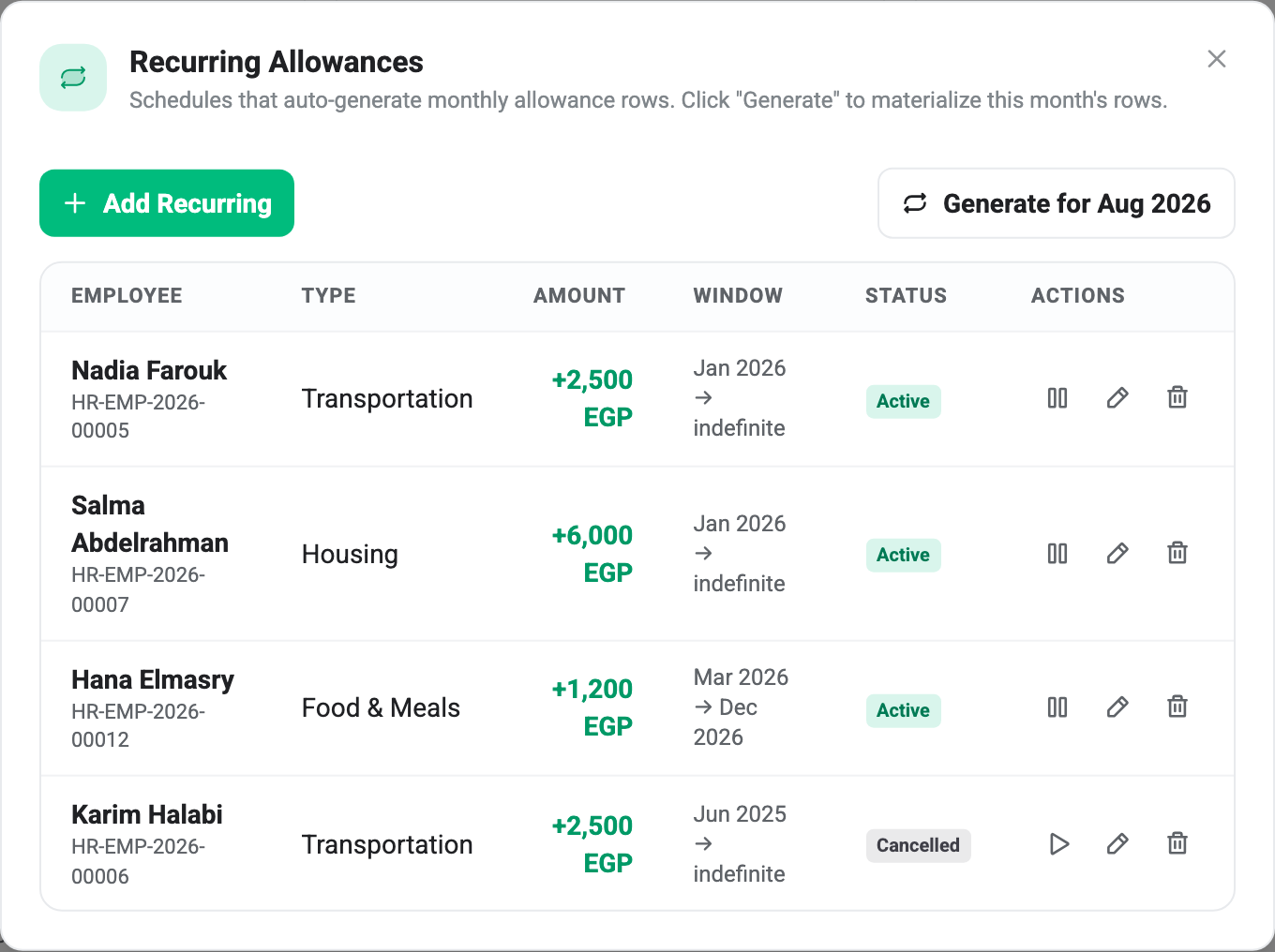
Nothing happens on its own
The subtitle says these schedules “auto-generate” monthly rows. They don’t, and this is the single most important thing to know about the feature.
There is no scheduled job behind it. Generate for Aug 2026 is the only thing that ever creates rows, somebody has to press it, and until they do the month’s allowances simply aren’t there. A schedule that has been sitting there Active since January has produced nothing at all in a month nobody generated.
In practice this means adding one step to your monthly routine: open Recurring, press Generate, then look at the allowances list. Doing it in the other order is how a housing allowance goes missing from a pay run.
The button always targets the month the Allowances page is currently showing, so check the month picker behind the modal before pressing it.
What Generate actually does
It walks every schedule and creates an allowance row for the ones that qualify. A schedule is skipped when:
- It isn’t Active. Cancelled schedules are ignored.
- The month is outside its window. Hana Elmasry’s meal allowance runs Mar → Dec 2026, so it produces nothing in January.
- A row already exists. The same schedule can’t produce two rows for the same person in the same month.
That last one is what makes the button safe. Pressing Generate twice, or three times, or having two people press it an hour apart, does not double anybody’s allowance — the second press just reports everything as skipped. If you can’t remember whether you already ran it, run it.
You get a summary when it finishes: Generated 3 rows · 1 skipped.
Generated rows still need approving
The rows it creates land as Pending, exactly like ones typed in by hand.
This catches people out, because a standing instruction feels like a decision that was already made — the housing allowance is in the contract, why is it waiting for a signature? But payroll counts approved rows only, so a generated row that nobody approves is worth nothing when the run is built. Generating is half the job.
Once generated they are ordinary allowances. They appear in the table, they can be edited, disputed or approved individually, and the schedule that made them has no further say — editing a generated row to 7,000 doesn’t change next month’s, and changing the schedule to 7,000 doesn’t change the row already made.
Setting one up
Add Recurring asks for the employee, the type, the amount, and the window: a start month, and an end month you can leave empty.
Leaving the end month empty means indefinite, which is right for a contractual allowance — it should stop when somebody’s circumstances change, not on a date you guessed a year ago. Set an end month when the arrangement genuinely has one: Hana Elmasry’s meal allowance ends in December because the site she works at closes then.
The window is checked at generation, not at creation, so a schedule can be set up ahead of time and it simply produces nothing until its start month comes round.
Pausing and stopping
The pause button stops a schedule producing anything further. It reports “Recurring paused” and the row’s status reads Cancelled — same thing, two names for it. The play button reverses it.
That reversibility is worth flagging, because Cancelled means something much more final everywhere else in payroll. A cancelled pay run is dead. A cancelled recurring allowance is just switched off, and switching it back on is one click. Karim Halabi’s transport schedule in the screenshot is cancelled rather than deleted, which is what you want for somebody who has moved to a desk job but might move back.
Delete removes the schedule permanently, and BeeHR is explicit that rows it has already produced are left alone. Deleting a housing schedule in August does not remove the January-to-July allowances it created, and it certainly doesn’t touch pay runs that have already used them. Only the future stops.
What you can change later
Editing an existing schedule gives you the amount, the end month and the reason. The employee, the type and the start month are fixed — they define which schedule this is, and changing them would quietly rewrite history that generated rows are already pointing at.
So a raise to somebody’s housing allowance is an edit to the amount, and it applies to months generated from that point on. Months already generated keep the figure they were made with, which is the correct behaviour if any of them have been paid.
Recurring schedules only exist for allowances. Money going the other way on a repeating basis — a loan being paid back over ten months — works differently, and is covered in Loans and Installment Deductions.