
A promotion in BeeHR is a dated change of designation, approved by somebody other than the person raising it, with an optional salary adjustment attached.
That’s narrower than the word usually means, and the narrowness is the point. It isn’t a performance review, a pay rise on its own, or a change of team — those are three other things. It’s the record that somebody’s job title changed, when, who agreed, and what it cost.
Everything lives under Lifecycle → Promotions.
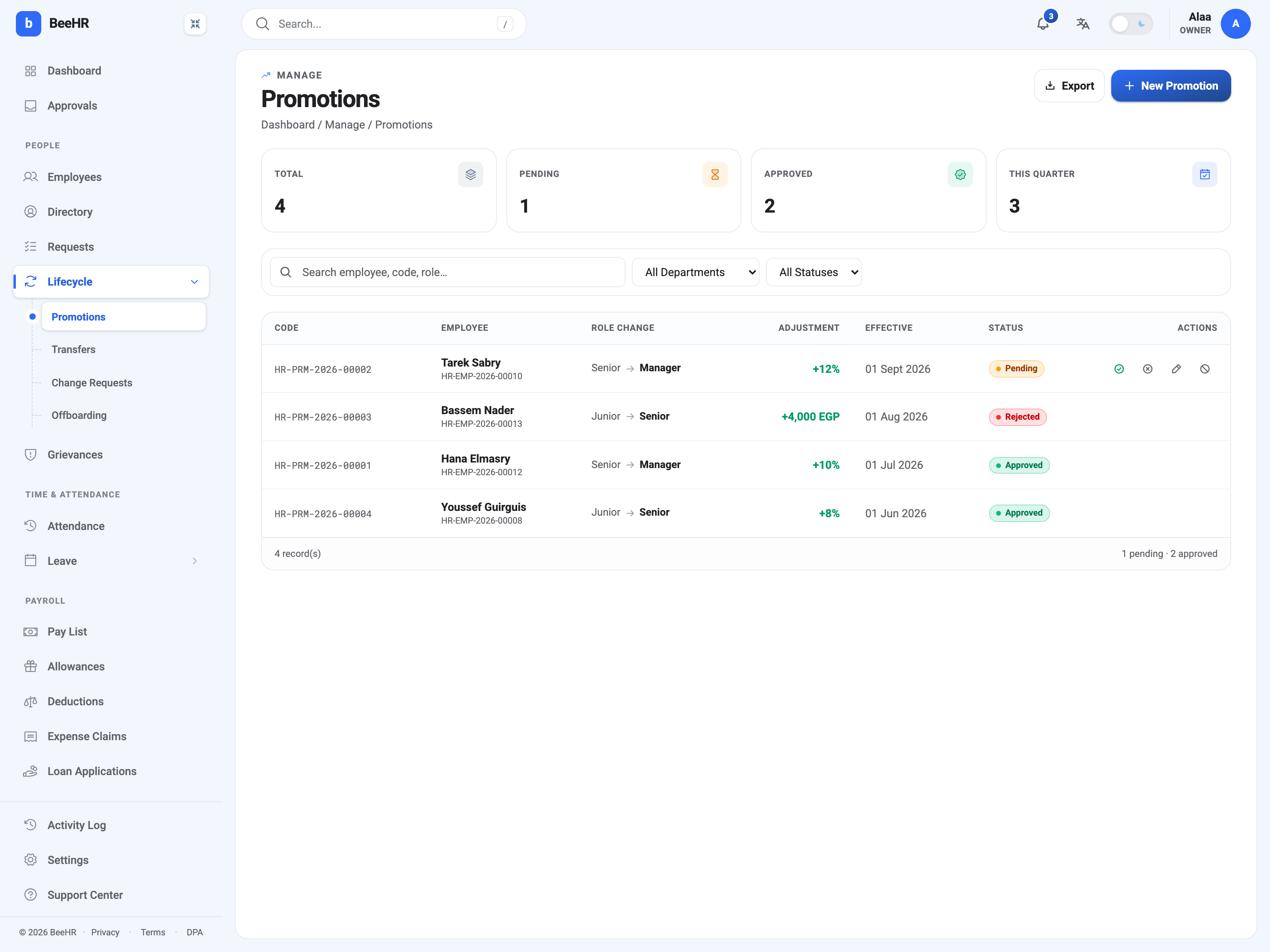
The four things a promotion holds
The employee, and the designation they’re moving to — read from the designations catalogue, which is why that list being tidy matters here. The row shows the move as Senior → Manager, so the “from” is whatever they held when the promotion was raised.
An effective date. This is not the date it was approved and not the date it was created. It’s when the change is supposed to take hold, and it can be in the future — Tarek Sabry’s sits at 1 September.
A salary adjustment, optional, expressed as either a percentage or a fixed amount. The list shows both forms side by side: +12% and +4,000 EGP. Leaving it empty is legitimate — a title change with no money attached is a real thing.
Approved is not the same as applied
This is the part that catches people out, and it’s worth being precise about.
Approving a promotion agrees to it. It does not immediately change the employee’s designation. A separate scheduled process applies approved promotions when their effective date arrives — so an approved promotion dated next month sits in an agreed-but-not-yet-applied state until then.
The practical consequences:
- An employee’s record still shows the old designation after approval, until the date passes. That is correct, not a sync failure.
- Reverting is only possible once a promotion has been applied. Attempting it before then is refused: only an applied (Approved) promotion can be reverted. Before the date arrives, the way to undo an approved promotion is different — see Creating, Approving and Reverting a Promotion.
The states
Pending — raised, waiting for a decision. The only state with actions on the row: approve, reject, edit and cancel.
Approved — agreed. Will apply on its effective date, then becomes revertable.
Rejected — declined. It stays on the list with its reason rather than disappearing, which is deliberate: a promotion that was proposed and turned down is part of somebody’s history, and deleting it would lose the fact that the conversation happened.
Reverted — an applied promotion undone, putting the designation back.
Notice what’s missing: there’s no “returned for changes”. A promotion that needs different terms is rejected and raised again, or edited while still Pending.
What a promotion touches
The designation on the employee record — on the effective date.
Their compensation, if a salary adjustment was set. The raise is written as a proper revision, so it appears in the salary history with the promotion as its reason rather than as an unexplained change. See Compensation: Salary and Its History.
Nothing about their department, branch or manager. A move between teams is a transfer, and the two are separate records even when they happen together. Somebody promoted and moved needs both, which is why Promotion-related is one of the transfer reasons.
Reading the tiles
Total, Pending, Approved and This quarter sit above the list.
Pending is the actionable one — those are decisions somebody is waiting on, and they also appear in the approvals queue on the primary dashboard.
This quarter counts promotions raised in the current quarter regardless of outcome, which makes it a rough measure of activity rather than of progression. For the progression question — who hasn’t moved in a long time — the Longest since promotion card on the Lifecycle dashboard is the better read.
Who can do what
Raising a promotion and deciding one are separate permissions, and the split is the point of the module: the person who proposes shouldn’t be the person who signs it off. Which permissions land where is set in Roles and Access, and the rules that govern eligibility and notice are in Promotion Settings.