
Bank details live on the person, not in payroll settings. Open anyone from All Employees and pick the Bank accounts tab — it’s about two-thirds of the way along the tab strip, so you may need to scroll it sideways.
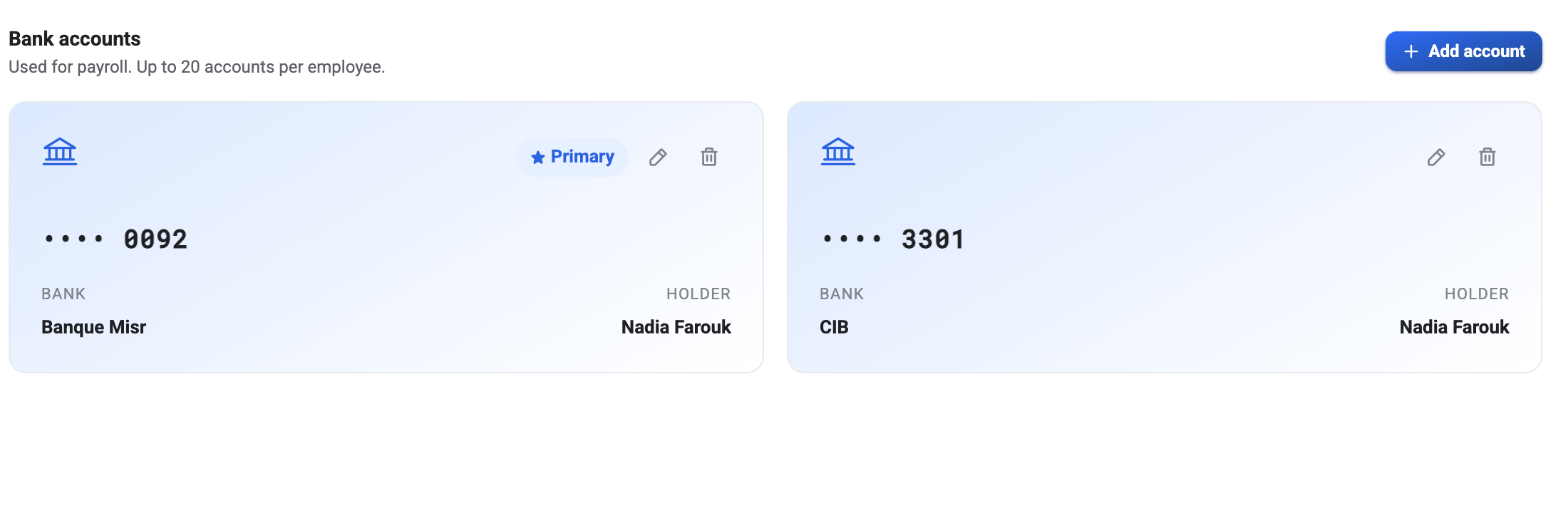
The Primary account is the one that gets paid
You can store up to twenty accounts against one person, but payroll only ever uses the one marked Primary. Everything else is a record, not an instruction.
The first account you add becomes Primary automatically — there’s no way to have somebody on file with accounts but no primary one. Adding a second leaves the first in charge unless you say otherwise, and promoting one demotes the other, so exactly one is always marked.
That is worth knowing when somebody changes bank. Adding the new account does not redirect their salary. You have to make it Primary as well, and it is a genuinely easy step to miss when you’re adding an account someone emailed you in a hurry.
What each field is for
Bank name and branch are for the humans reading a payment file later.
Account number is what actually matters, and it’s the field to double-check before saving, for a reason covered below.
Account holder name defaults to the employee and should almost always stay that way. Banks reject transfers where the name doesn’t match the account, so if this differs from the name on the account at the bank, the payment bounces — not in BeeHR, but at the bank, days later.
Only the last four digits come back
Once saved, the card shows •••• 0092 and nothing more. Reopening the record
does not reveal the full number, and neither does editing the account.
This is deliberate — a payroll screen that anybody with a laptop can read over your shoulder shouldn’t put whole account numbers on display. The practical consequence is that you cannot verify a saved number by looking at it. If you aren’t sure a number was typed correctly, the only way to be certain is to delete the account and add it again.
So read it back to yourself before you press save. You get one clean shot at it.
Editing and removing
Each card carries a pencil and a bin. Editing lets you correct the bank, branch or holder name; the account number can be replaced but never inspected.
Deleting is immediate and unconfirmed on the card, so be sure you have the right one — with two cards side by side and only four digits distinguishing them, that’s easier to get wrong than it sounds.
When somebody has no account at all
The tab is simply empty, and BeeHR lets it stay that way. Nothing stops you adding an employee, setting their salary and running payroll without ever entering bank details.
What happens then is that they appear in the pay run with a net figure and no destination — the calculation is fine, the payment has nowhere to go. If you are setting up payroll for the first time, walking the roster and checking every person has a Primary account is worth the twenty minutes.