
Access is the last tab on someone’s record, and you only have it if you can manage roles — otherwise it isn’t rendered at all. It’s where one person’s permissions are decided, as opposed to Roles and Access, which is where the roles themselves are built.
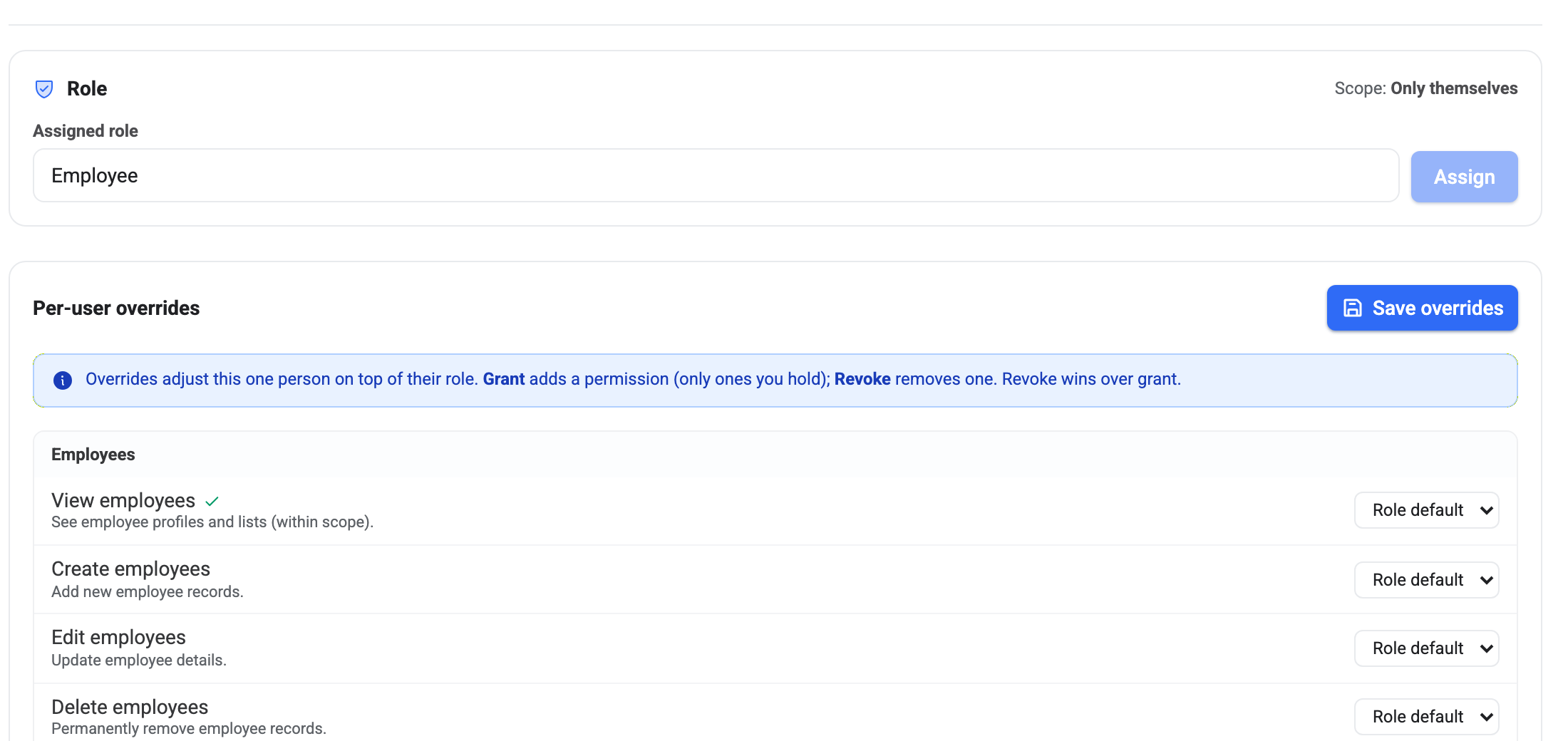
Role first
Assigned role is the one control most people ever need. Pick a role, press Assign, and the person inherits everything that role carries.
Next to it sits Scope, and it’s easy to overlook even though it does half the work. Scope is whose data the person can act on, and it comes from the role rather than being set here:
- All employees — the whole company.
- Their branch — everybody at their location, nobody elsewhere.
- Direct reports — only the people who report to them.
- Only themselves — their own record and nothing else.
Permission and scope multiply. “View employees” with a scope of Direct reports is a manager who can open their own team and nobody else. The same permission with a scope of All employees is an HR administrator. The tick in the list tells you whether they can do a thing; the scope line tells you to whom.
Per-user overrides
The list underneath is every permission in BeeHR, grouped by area, each with a dropdown offering three choices:
- Role default — inherit whatever the role says. This is where everything starts, and where most things should stay.
- Grant — give this one person a permission their role doesn’t include.
- Revoke — take one away that their role does include.
A green tick beside a permission’s name means it’s currently in effect for this person, after the role and any overrides have been worked out. That’s the line to read if you want to know what is actually true right now, rather than what you think you configured.
Press Save overrides when you’re done — the dropdowns don’t apply as you change them.
Two rules that catch people out
Revoke wins over grant. If a permission is granted and revoked in different places, it ends up revoked. BeeHR fails closed on purpose: a mistake in the permission model should leave somebody unable to do something, not quietly able to do everything.
You can only grant what you hold. Any permission you don’t have yourself is disabled in the dropdown and labelled (you lack). You can still revoke it — taking something away is always allowed — but nobody can use this screen to hand out more authority than they have. It is the same guardrail that stops you creating an employee with a role above your own.
When to reach for an override — and when not to
Overrides are a scalpel. They’re right for the genuine one-off: the office manager who also needs to approve expenses, the analyst who should see payroll figures but change nothing.
They are the wrong tool for anything you’d have to do twice. If you find yourself applying the same two grants to every new hire in a department, that is a role waiting to be created — and a role is visible from the settings screen, where an override is buried on one person’s record. Six months later, nobody remembers to look here.
The honest test: if somebody asked “why can this person do that?”, would the answer be findable? A role name answers it. A grant somebody set last spring does not.