
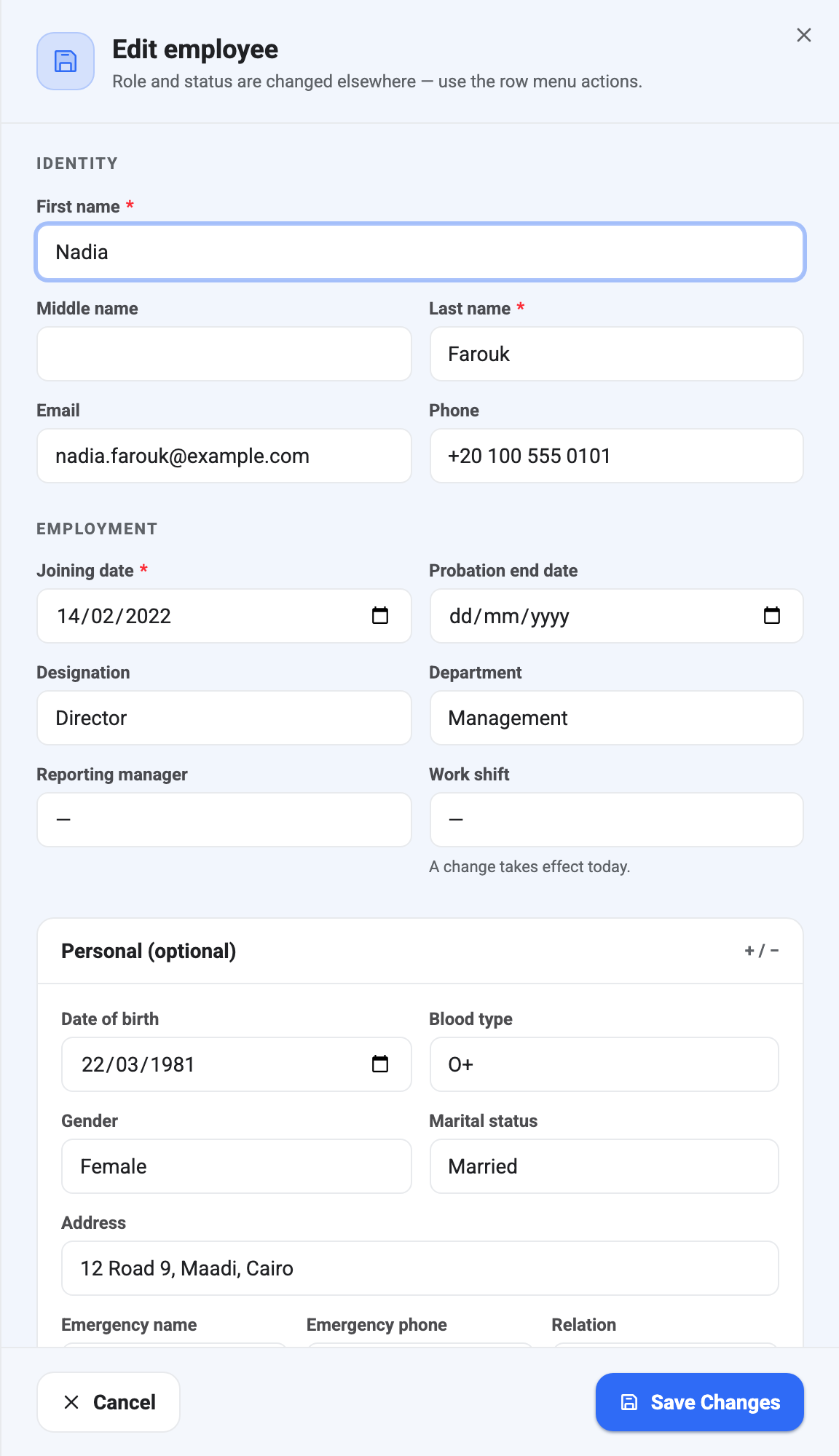
Edit sits next to the person’s name on their record, and there’s a matching entry in the ⋮ menu on their row in All Employees if you’d rather not open the record at all.
What’s missing compared to adding someone
Four sections from the Add panel aren’t here, and their absence is deliberate:
- Status and Role are separate actions with their own confirmation dialogs, because both have consequences that a quiet field edit shouldn’t carry. The panel’s own subtitle points you at the ⋮ menu for them.
- Account access only appears when creating, since the invite is a one-time provisioning step. Inviting later is also a ⋮ action.
- Initial salary is a starting point, not something you overwrite. Pay changes go through Revise salary on the Compensation tab so the history survives.
The other difference is that Personal and Work info start expanded here rather than collapsed. When you’re adding someone you rarely have that detail yet; when you’re editing, it’s usually why you opened the panel.
Work shift changes apply from today
The Work shift field carries a small note in edit mode — a change takes effect today — and it means it literally.
Assigning a shift when you first add somebody backdates the assignment to their joining date. Changing it later does not: BeeHR records the new shift from today forward and leaves everything before that evaluated against the old one. That is what you want almost every time. Somebody who moved from an early shift to a late one in June shouldn’t retroactively become punctual — or late — for all of May.
Assigning a shift also needs the attendance settings permission rather than the ordinary edit permission. A shift’s start time is what lateness is measured against, so it isn’t treated as a profile field.
Changing department or designation is not a transfer
You can edit both fields here, and doing so simply overwrites them. No lifecycle record is created, nothing goes for approval, and nobody is notified.
That is fine for fixing a mistake — somebody was filed under the wrong team on their first day. It is the wrong tool for an actual move. A real change of team or title should go through Transfers or Promotions, which keep a dated, approved record of what changed and why. Editing the field leaves the person’s Promotions and Transfers tabs empty and their history looking like they were always in the new team.
What employees can edit about themselves
Somebody with no permission to manage employees can still open their own record and edit it — but only the personal half. In practice:
They can change date of birth, gender, marital status, blood type, address, work location and grade.
They can’t change their name, email, phone, joining date, probation end date, designation, department, reporting manager or photo. Those all describe their employment rather than themselves, and letting somebody rewrite their own joining date or manager would undermine most of what BeeHR is for. An attempt comes back refused rather than silently ignored.
Small things worth knowing
Nobody can be set as their own reporting manager — the field rejects it.
When you save, the confirmation tells you how many fields actually changed. If it says nothing was saved, nothing was different; the panel does not treat re-typing the same value as a change.
Every save is written to the Activity Log with your name against it.