
Settings → Business Profile is who the company is: the legal details that belong on documents, the logo, and a set of locale defaults.
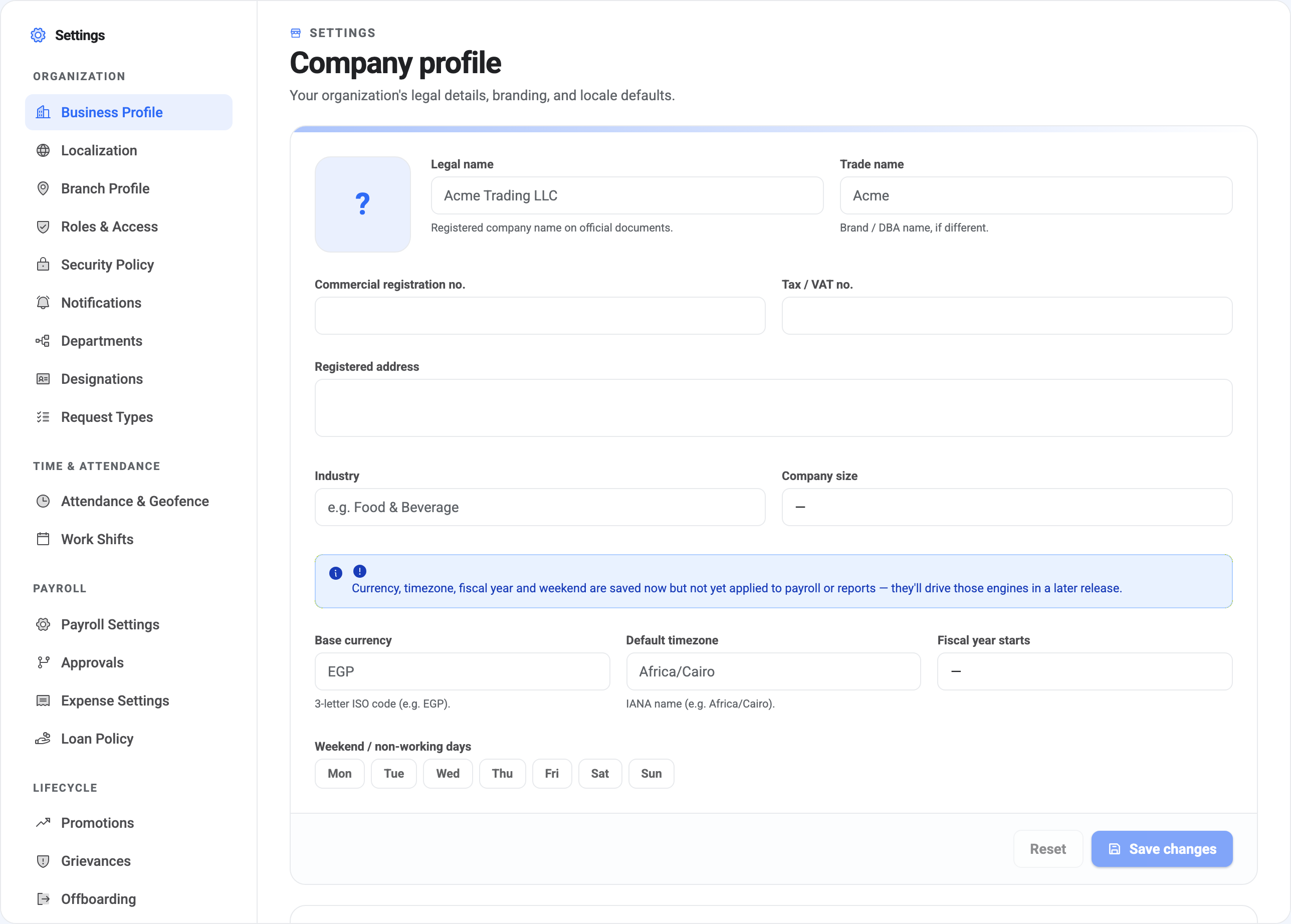
Legal name and trade name
Legal name is the registered company name, the one that belongs on official documents. Trade name is what you’re actually called day to day, if it differs — Acme Trading LLC and Acme.
Fill both in even when they’re the same. Documents generated by BeeHR reach for the legal name, and interfaces tend to show the trade name; leaving one blank means something eventually renders as an empty space.
Commercial registration and Tax / VAT number are free text and go on generated documents where your jurisdiction expects them. Registered address is the legal address, not necessarily where anybody works — locations are branches.
Industry and Company size are descriptive only. Nothing keys off them.
The logo
The square beside the name uploads your logo. It appears in the dashboard’s top bar and on documents BeeHR generates, so a square-ish image with clear margins survives the scaling better than a wide wordmark.
Four fields that don’t do anything yet
This is the part to read carefully, because the screen is candid about it and it is easy to skim past:
Currency, timezone, fiscal year and weekend are saved now but not yet applied to payroll or reports.
All four accept a value, store it, and show it back to you. What they don’t do is drive behaviour. Concretely:
Base currency is used for formatting — the currency preview on Localization reads it, and amounts are displayed with it. It does not convert anything, and payroll has no multi-currency handling.
Default timezone is stored but does not shift how timestamps are recorded or displayed.
Fiscal year starts is not yet used by any report. Reporting periods are calendar months.
Weekend / non-working days is the one most likely to mislead, because it looks exactly like the setting you’d want. It isn’t wired up, and BeeHR genuinely has no company-wide weekend — weekends are defined per shift, and a person’s weekend comes from the shift they’re assigned. See Work Shifts, which is where to actually change this.
Setting them does no harm and they’ll presumably come into force in a later release. Just don’t expect a payroll or attendance behaviour to change because you changed one.
The read-only identity block
Below the form sits an Identity card you can look at but not edit:
Business type was chosen at sign-up and seeded your starter catalogue — the initial departments, designations and request types. It can’t be changed here, and changing it wouldn’t retroactively reshape catalogues you’ve since edited anyway.
Account ID is your tenant’s identifier. It’s worth knowing where to find it, because it appears in support conversations and it’s the code in your SpeakUp portal URL.
Owner email, Your role and Default branch round it out — useful for confirming, at a glance, which account and which role you’re actually operating as.
Saving
Save changes applies the form; Reset restores the last saved values rather than defaults. The identity card below is unaffected by either.