
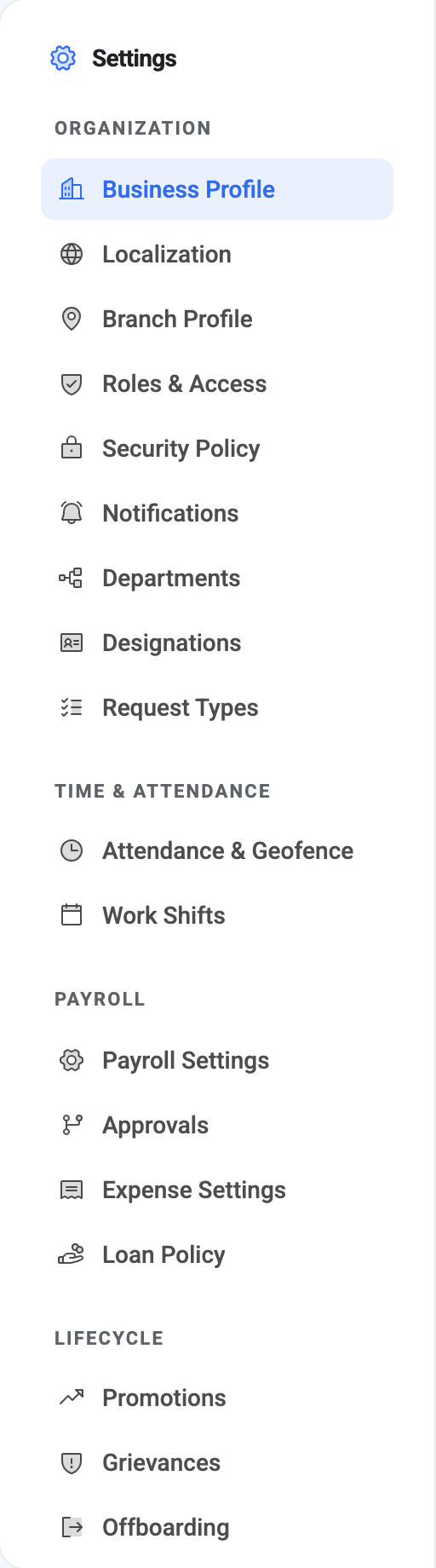
Almost everything configurable in BeeHR is behind one door. Settings at the bottom of the sidebar opens a rail of panels, grouped into four sections, and every panel is one screen with one subject.
There is no landing page
Worth knowing before you go looking for one: /settings on its own doesn’t
render anything. It redirects straight to the first panel you have permission
to see, and for most administrators that’s Business Profile.
So “the settings hub” is the rail, not a dashboard. There is no overview screen, no search across settings, and no summary of what’s configured. You navigate by knowing which panel owns the thing you want to change — which is what the rest of this article is for.
The four sections
Organization is the company itself: who you are, how the product is formatted, who can do what, and the catalogues (departments, job titles, request types) that the rest of BeeHR draws its dropdowns from.
Time & Attendance is how work time is defined and recorded — working hours and weekends, and the geofence rules for clocking in.
Payroll is the money rules: tax and insurance, who gets notified about approvals, and the policies for expenses and loans.
Lifecycle is the settings for the processes people go through — promotions, grievances and off-boarding.
The split is by subject, not by how often you’ll touch it. Some of these are set once at signup and never revisited; others are edited monthly.
Where to find what
| I want to change… | Panel | Article |
|---|---|---|
| Company name, logo, address | Business Profile | Your Company Profile |
| Language, currency, timezone, date format | Localization | Localization |
| A branch’s own details | Branch Profile | Branch Profile Settings |
| What a role can do | Roles & Access | Roles and Access |
| Password rules, session length, 2FA | Security Policy | Security Policy |
| Which events send email | Notifications | Notification Preferences |
| The list of departments | Departments | Departments |
| The list of job titles | Designations | Designations |
| The kinds of request people can raise | Request Types | Request Types |
| Geofence and self check-in | Attendance & Geofence | Attendance Settings |
| Working hours and weekends | Work Shifts | Work Shifts |
| Tax and insurance rates | Payroll Settings | Payroll Settings and Approval Chains |
| Who is notified about approvals | Approvals | Payroll Settings and Approval Chains |
| Expense categories and limits | Expense Settings | Expense Categories and Settings |
| Loan eligibility and limits | Loan Policy | Loan Policy |
| Promotion rules | Promotions | Promotion Settings |
| Grievance categories and confidentiality | Grievances | Grievance Settings |
| Off-boarding checklists | Offboarding | The Off-Boarding Queue, Analytics and Settings |
Two things people look for here and don’t find:
One person’s permissions are not in Settings. Roles are defined here, but bending a role for an individual happens on their own record — see Employee Access and Permissions.
Your own password, language and 2FA are not here either. Those are account settings rather than company settings, and they live under your name in the top right. Changing the company’s default language in Localization does not change yours.
Your rail may be shorter than somebody else’s
Every panel is gated on a permission, and a panel you can’t use isn’t shown at all — not greyed out, not present-but-disabled. Absent.
That has a practical consequence worth internalising: “it isn’t in my settings” and “BeeHR doesn’t have it” look identical from the inside. If a colleague describes a screen you can’t see, the likely answer is a permission rather than a missing feature.
The gates are grouped sensibly rather than one-per-panel. account.settings.manage
alone controls four panels — Business Profile, Localization, Security Policy and
Notifications — so those four appear and disappear together. Others have their
own: role.manage for Roles & Access, branch.manage for Branch Profile,
department.manage for Departments, payroll.settings.manage for both payroll
panels.
If you hold none of them, Settings opens to a message rather than a panel.
A note on saving
Panels save independently, and several save sections independently — Payroll Settings has a separate button for tax and for insurance, and the Approvals panel has one per chain. There is no global save and no “unsaved changes” warning when you navigate away.
Press the save button belonging to the block you edited, and check the confirmation before moving on.